
Invoice generation software: invoices and delivery notes online
Invoice generation software that creates invoices, delivery notes and packing lists straight from a sale: the customer, products, prices and discounts fill in automatically. Your own company details and logo, several sole proprietors (FOP) in one account, PDF, Excel or print — in 1 click.

Which documents you can create
HugeProfit comes with ready-made documents for sales and the warehouse. Copy any of them and tailor it to your needs — that's invoice and delivery note software with no Word or Excel.
Payment invoice (bill)
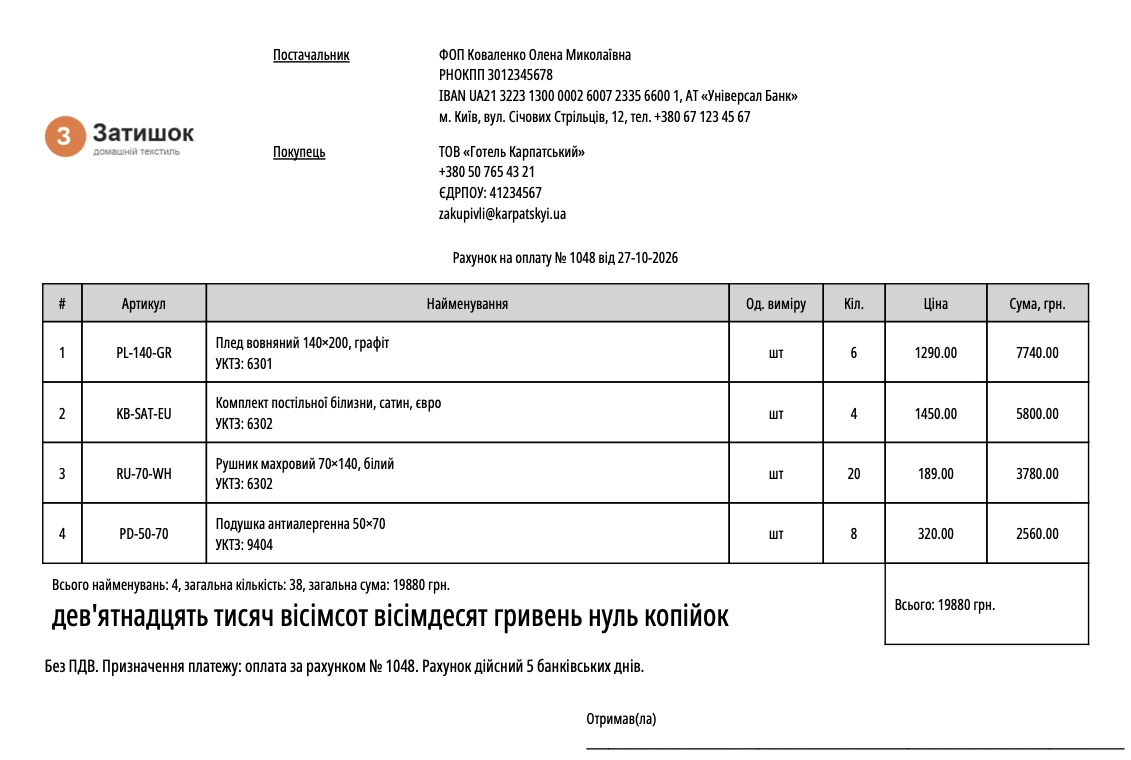
Seller's details, the buyer with their EDRPOU code, goods or services, the amount in words, a VAT note or “no VAT”. Create an invoice online from any sale.
Delivery note
For handing goods over to the buyer, with “Supplied by” and “Received by” signature lines. Create a delivery note online from the same sale as the invoice.
Packing list
A full table: SKU, unit, barcode, UKTZED (HS) code, bundle components. Get your packing list online as a PDF or Excel file.
Sales receipt
For thermal printers, with adjustable width in mm. A sales receipt isn't a fiscal one — fiscal receipts are issued via a software cash register (PRRO).
Custom document
Certificate of completed work, sales quote, warranty card: your own title, text and fields.
Goods received note
A receiving note with the purchase price or the selling price. Learn more about purchase and supply management.
Stock transfer note
Moving goods between warehouses and points of sale. See how transfers between warehouses work.
Supply summary
Several supplies summed up in one document: what arrived, how much and at what price.
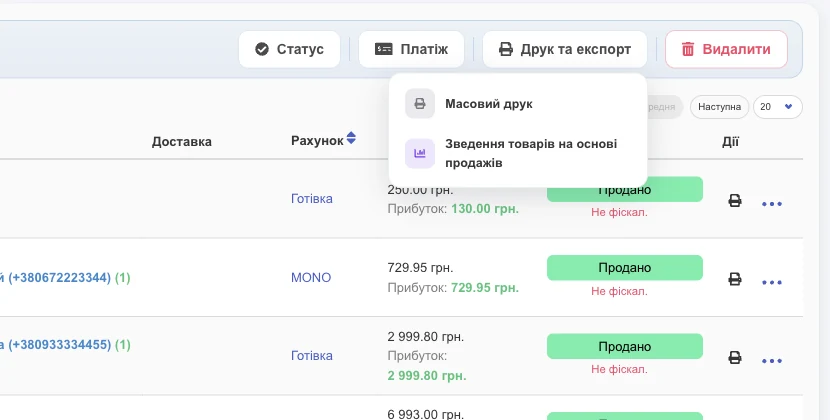
Mass printing
Select several sales and get documents for all of them in one file. Handy for wholesale shipments.
How to create an invoice online in 3 steps
Add a sale, click “Documents” and choose “Payment invoice” — your PDF is ready. Your details and layout are set up just once.
-
1
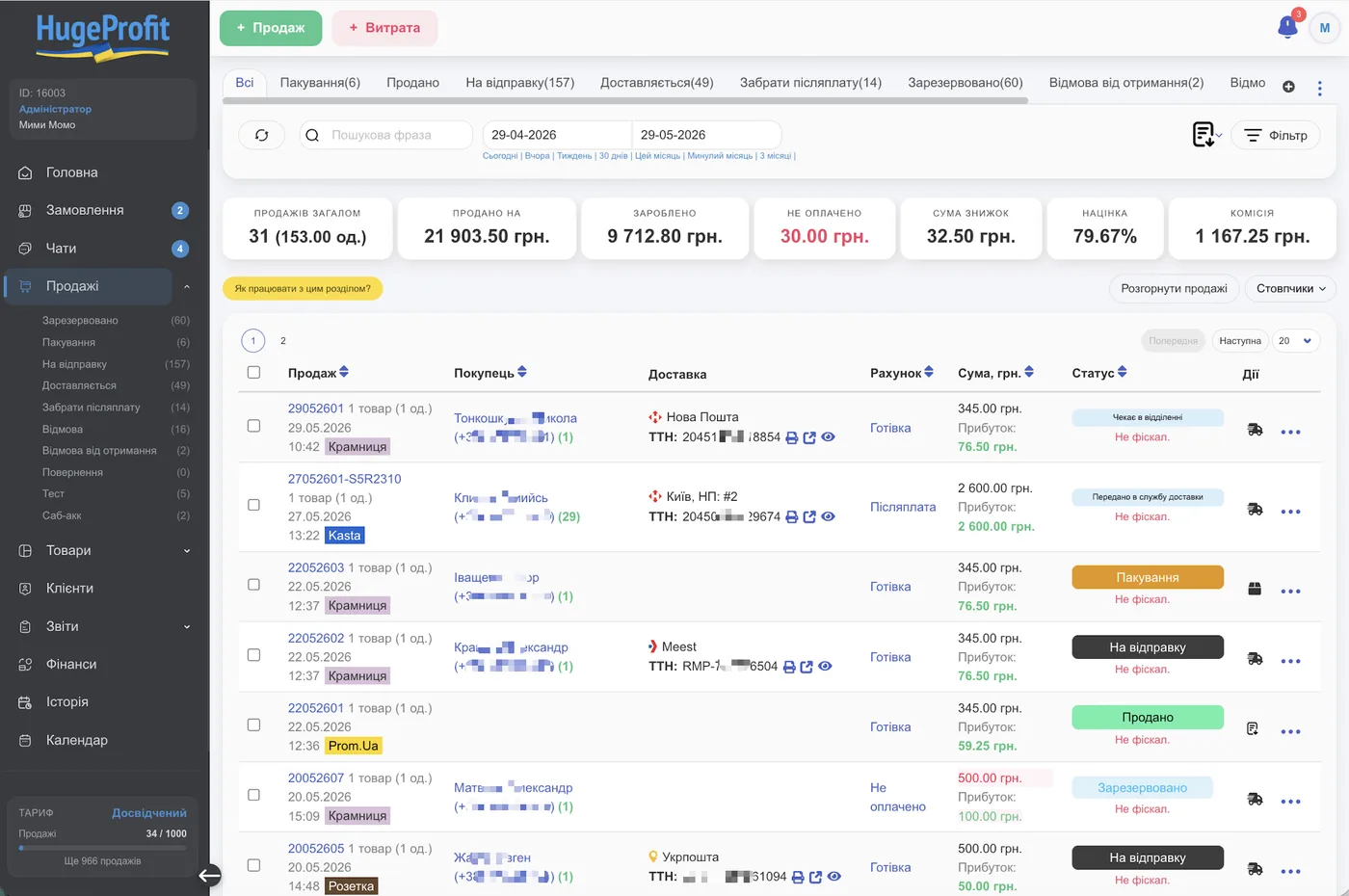
Add a sale or accept an order
From your website, Prom, Rozetka, Instagram or manually. The customer and products are already in the sale — nothing to retype.
-
2
Choose a document
“⋯ → Documents” or the quick 🖨 button, which prints your default document. For several sales, use “Print & export → Mass printing”.
-
3
Send or print
PDF, Excel or a thermal receipt. Or generate a payment link and send it to the customer in a chat.
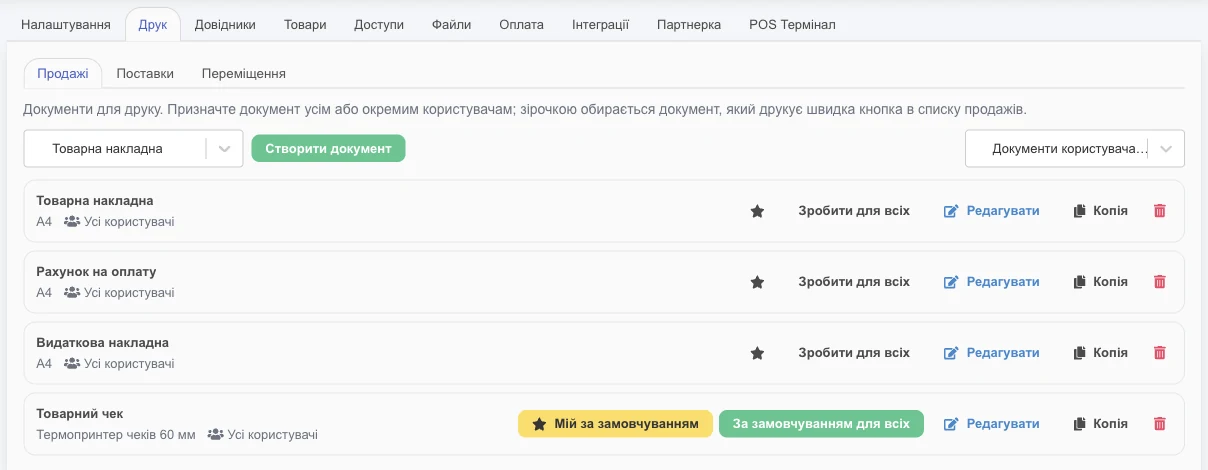
As many documents and company details as you need — even for several sole proprietors
Create a separate document for each sole proprietor or LLC, with its own details and logo. Up to 50 documents of each type in one account.
Running two sole proprietorships, or a FOP and an LLC? Create a separate document for each one: its own details, IBAN, EDRPOU code, logo and name. For example, “Invoice — FOP Kovalenko” and “Invoice — TextileGroup LLC”.
Need a delivery note without the cost price for the customer and one with it for the warehouse? Click “Copy” and remove the extra column.
- ✓“Create document” from scratch or “Copy” a ready-made one
- ✓A separate logo for the document or your account-wide logo
- ✓Your own name in the document list and in the PDF
- ✓Title and file name with shortcodes:
Invoice_{order_id}_{order_date}
Documents for your team: who sees and prints what
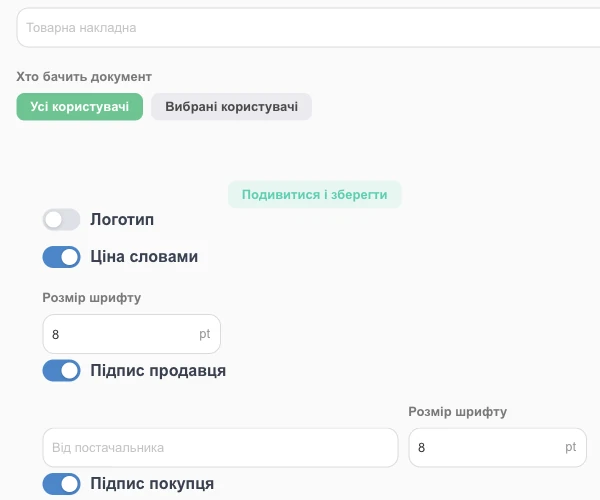
Give a document to all employees or only selected ones. A cashier at a store sees only their receipt, while a wholesale manager sees the invoice and the delivery note.
Only users allowed by their access permissions can see the purchase price on a document.
Customize your invoice — no designer needed
Tick what to show in the header, table and footer. Check the result with the “View and save” button.
🏷️Header
- Company information: name, address, IBAN, EDRPOU code
- Logo — at the top, left, right or bottom
- Customer: name, phone, email, company, EDRPOU/RNOKPP
- Waybill number and barcode, delivery
- Date, seller, sales channel
📑Table
- Line numbers, photo, SKU, name
- Unit, quantity, price, discount, total
- Cost price — for your team only
- Barcode and UKTZED (HS) code
- Bundle components and your custom fields
✍️Footer
- Amount in words — automatic
- “Total without VAT”
- Seller and buyer signatures with your own text
- Sale comment
- Payment terms, warranty, returns
Invoice with a payment link
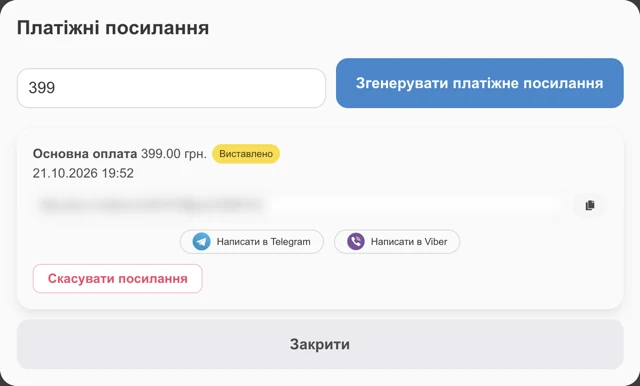
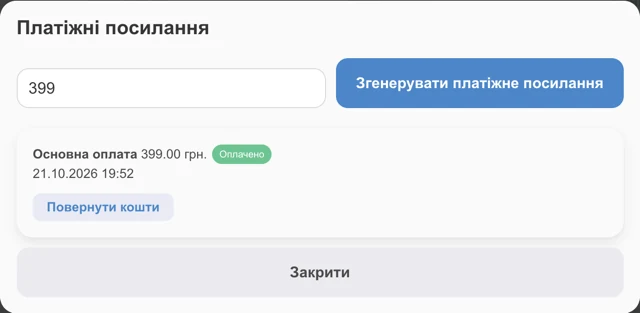
Issued an invoice? Let the customer pay right away. Connect your Monobank or WayForPay acquiring, generate a payment link for the sale and send it via Telegram, Viber or Instagram.
Once the customer pays, the sale is marked as paid, and the money can be credited to the right account automatically. Customer debts are shown in customer and supplier settlements.
Print, PDF, Excel and links
Software for printing invoices and delivery notes: one document, several ways to get it to the customer.
HugeProfit vs. Word/Excel vs. accounting software
In Word and Excel, you fill in an invoice by hand. In HugeProfit, it's built from the sale, and stock is written off automatically.
| Feature | Word / Excel | Accounting software | HugeProfit |
|---|---|---|---|
| Customer and product data | manual entry | from reference lists | from the sale, automatically |
| Stock is written off | no | yes | yes |
| Several FOPs, own details | separate files | yes | yes, up to 50 documents of each type |
| Employee access | no | complicated | with checkboxes |
| Payment link | no | rarely | Monobank, WayForPay |
| Orders from Prom, Rozetka, your website | no | no | yes |
| Price | free | paid license | free up to 50 sales/mo |
Who this invoice generation software is for
Anyone who sells goods or services and invoices customers: from a single sole proprietor to a team with several warehouses.
Sole proprietors and small businesses
Invoicing software for sole proprietors: invoices from several FOPs in one account, each with its own details.
Wholesale
An invoice and a delivery note for every shipment, mass printing for all of them.
CRM for wholesale →Online stores
Delivery notes for orders from your website, Prom and Rozetka — no retyping.
CRM for online stores →Warehouse
Goods received notes and transfer notes between warehouses and stores.
Warehouse CRM →Manufacturing
Invoices and delivery notes for finished products, with the cost price visible to your team only.
Production accounting →Services
An invoice and a certificate of completed work as a custom document: services are added to the sale.
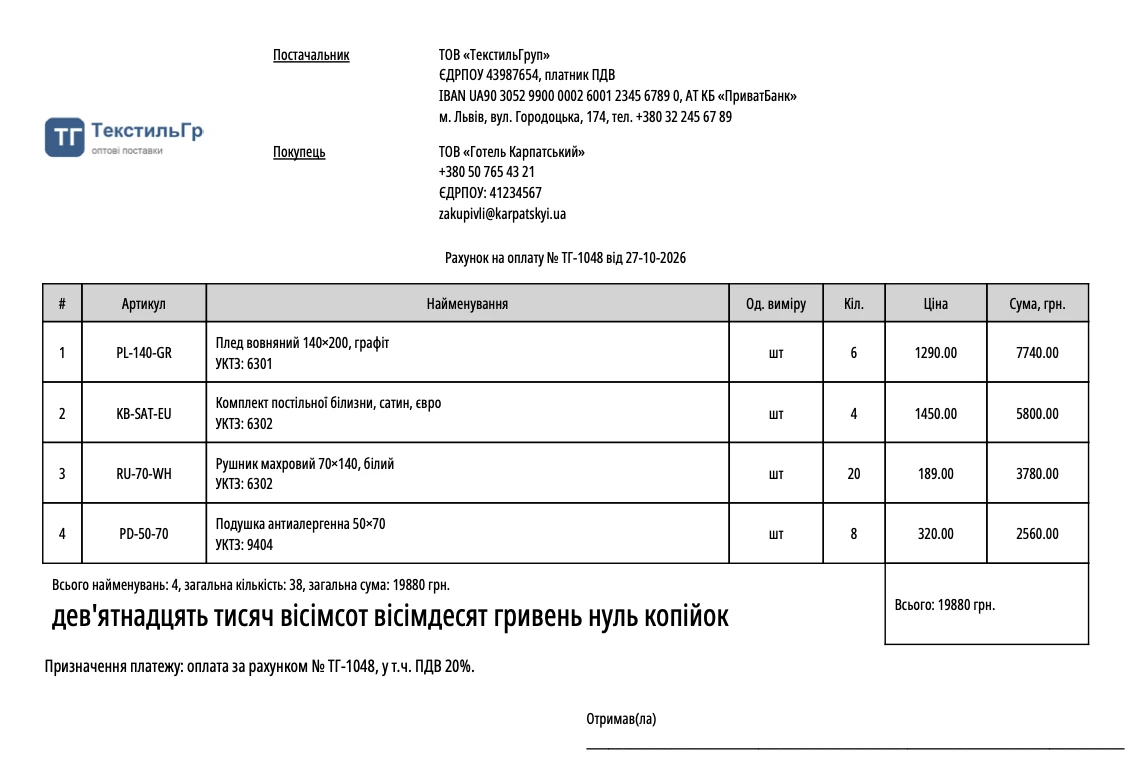
Sample payment invoice for a sole proprietor
This is a real invoice from HugeProfit with made-up details. The invoice template fills itself in — no blank form needed.
What a payment invoice in Ukraine includes
- Document title, number and date
- Seller's details: full name or company name, EDRPOU/RNOKPP, IBAN, bank
- Buyer
- List of goods or services with quantities and prices
- Amount in figures and in words
- VAT note or “no VAT”
- Payment reference
A blank delivery note and other document templates for sole proprietors are in the same “Printing” section.
What sellers say



Pricing
All document features are available on every plan, even the free one. Plans differ only in the number of sales and products.
- 50 sales / month
- 200 products
- ∞ employees
- ∞ warehouses
- All print documents
- 200 sales / month
- 3,000 products
- ∞ employees
- ∞ warehouses
- All print documents
- 1,000 sales / month
- 12,000 products
- ∞ employees
- ∞ warehouses
- All print documents
- ∞ sales / month
- 100,000 products
- ∞ employees
- ∞ warehouses
- All print documents
Change your plan at any time · All plans
Frequently asked questions
Updated October 29, 2026 · HugeProfit editorial team
Create your first invoice in 2 minutes
Sign up with no card. Up to 50 sales a month — free, with all documents.
Start for free →