
Store address and custom domain
Every store gets a free name.h-profit.shop address with HTTPS. On the Store+ plan, you can connect a custom domain, such as shop.ua.
Address on h-profit.shop
- Format:
https://name.h-profit.shop. An HTTPS certificate is already included; there's nothing to set up. - Name requirements: Latin letters, digits, and hyphens, 3 to 40 characters. A hyphen can't be at the start or end.
- The address must be available. Some names are reserved; the system will let you know.
How to change the address
- Open Online store.
- Under the store name, click Change address.
- Enter the new address and click Save.
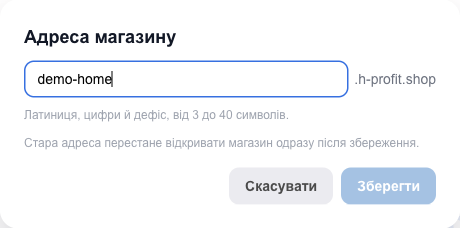
⚠️ The old address stops opening the store as soon as you save and becomes available to others. Update your links on social media, in ads, and on business cards. Your products, design, orders, and subscription stay the same.
💡 After changing the address, sign in to the site editor again through Edit website: sign-in is tied to the address.
Custom domain (Store+ plan)
You can connect a domain once the Store+ plan is paid (including during the free trial). On other plans, the store card says “A custom domain (e.g. shop.com) is available on the Store+ plan”.
You need to buy the domain itself from any registrar (for example, imena.ua, hostiq, nic.ua); HugeProfit doesn't sell domains.
How to connect
- On the store card, in the Custom domain block, click Connect domain.
- Enter the domain, for example
shop.ua. - Choose how to connect it (compared below) and click Connect domain.
- Follow the instructions the system shows, in your domain registrar's account.
- Wait: we check the settings automatically every 5 minutes. You can also click Check now right away. When everything is ready, the status changes from Waiting for DNS to Connected.
Which method to choose
| Via name servers (recommended) | Via a CNAME record | |
|---|---|---|
| What to do | At your registrar, replace the domain's name servers with our two (the system shows which ones, with a Copy button) | Add one CNAME record to the domain's DNS: the system shows the name and value |
| Which addresses work | Both shop.ua and www.shop.ua | Usually www.shop.ua or a subdomain (store.shop.ua). The root shop.ua works only if your DNS provider supports CNAME at the root domain |
| Email and other records | We move them over automatically; to change them later, contact HugeProfit support | Stay with you unchanged: you manage DNS yourself |
| How long to wait | A few minutes to 24 hours | A few minutes to a few hours |
💡 For the name server method, enter the root domain (shop.ua) without www or subdomains. If you want only a subdomain for the site (store.shop.ua), choose CNAME.
An HTTPS certificate for your domain is issued automatically. Once connected, the h-profit.shop address automatically redirects visitors to your domain.
Disconnecting a domain
Use the Disconnect domain button in the domain block. The store will work at the h-profit.shop address again. If you switch from Store+ to Store, the domain turns off automatically at the end of the paid period (status Disabled) and turns back on as soon as you return to Store+.
Possible messages
| Message | What to do |
|---|---|
| “Invalid domain. Example: shop.com” | Enter only the domain, without https://, paths, or spaces. |
| “For name servers, enter the root domain (shop.com) without subdomains…” | Remove www. or choose CNAME. |
| “This domain is already connected to another store” | Disconnect it in that store first. |
| “This store already has a domain — disconnect it first” | You can connect one domain per store. |
| “A custom domain is available on the Store+ plan” | Pay for the Store+ plan. |
| “This domain was added too many times recently…” | Try again in 3 hours. |
| “Connecting via CNAME isn't available yet — choose name servers” | Use the name server method. |
| Status stays at “Waiting for DNS” for a long time | Check that the name servers or the CNAME record are entered exactly, with no extra dots or spaces. Below the status, you'll see “Last check error”, which tells you what's wrong. Name server changes can take up to a day to apply. |