
Clients and marketing
How to track ad ROI in HugeProfit
The Marketing campaigns module shows whether your advertising pays off: how much you spent on a campaign, how many sales and how much profit it brought, plus ROAS, ROI, and CPA, with no spreadsheets or manual math.
New campaign
Left menu → Marketing → Marketing campaigns → Add campaign.
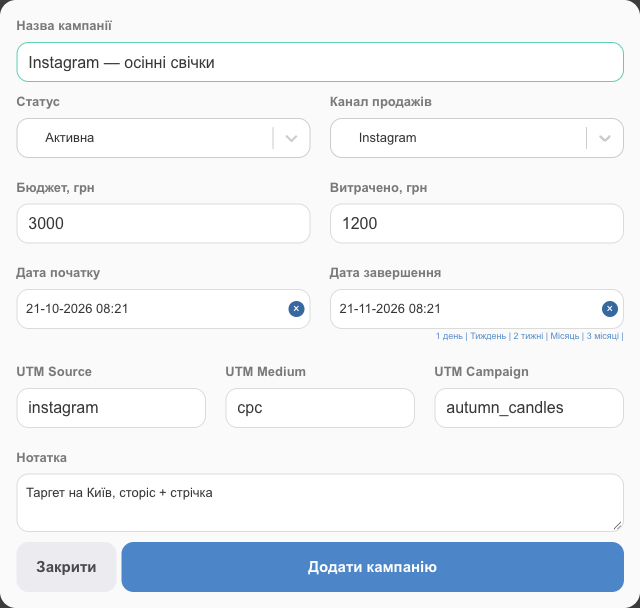
| Field | What to enter |
|---|---|
| Campaign name | For example, "Instagram: fall candles". |
| Status | Active, Paused, Finished. |
| Sales channel | Where clients from this ad come from. |
| Budget, Spent | The planned budget and how much you've already spent, in UAH (update it from your ad account data). |
| Start date, End date | The period. Quick options: 1 day, a week, 2 weeks, a month, 3 months. |
| UTM Source, UTM Medium, UTM Campaign | The UTM tags of the ad link. If a website order arrives with these tags, the campaign is added to the sale automatically. |
| Note | Audience, creatives, agreements. |
How sales get attributed to a campaign
- The sale window has a Marketing campaign field (Which ad brought this sale?). Select the campaign when the client came from an ad.
- For website orders, the campaign is matched automatically by UTM tags.
- The Marketing campaign filter in the sales list shows all sales for a campaign.
Results
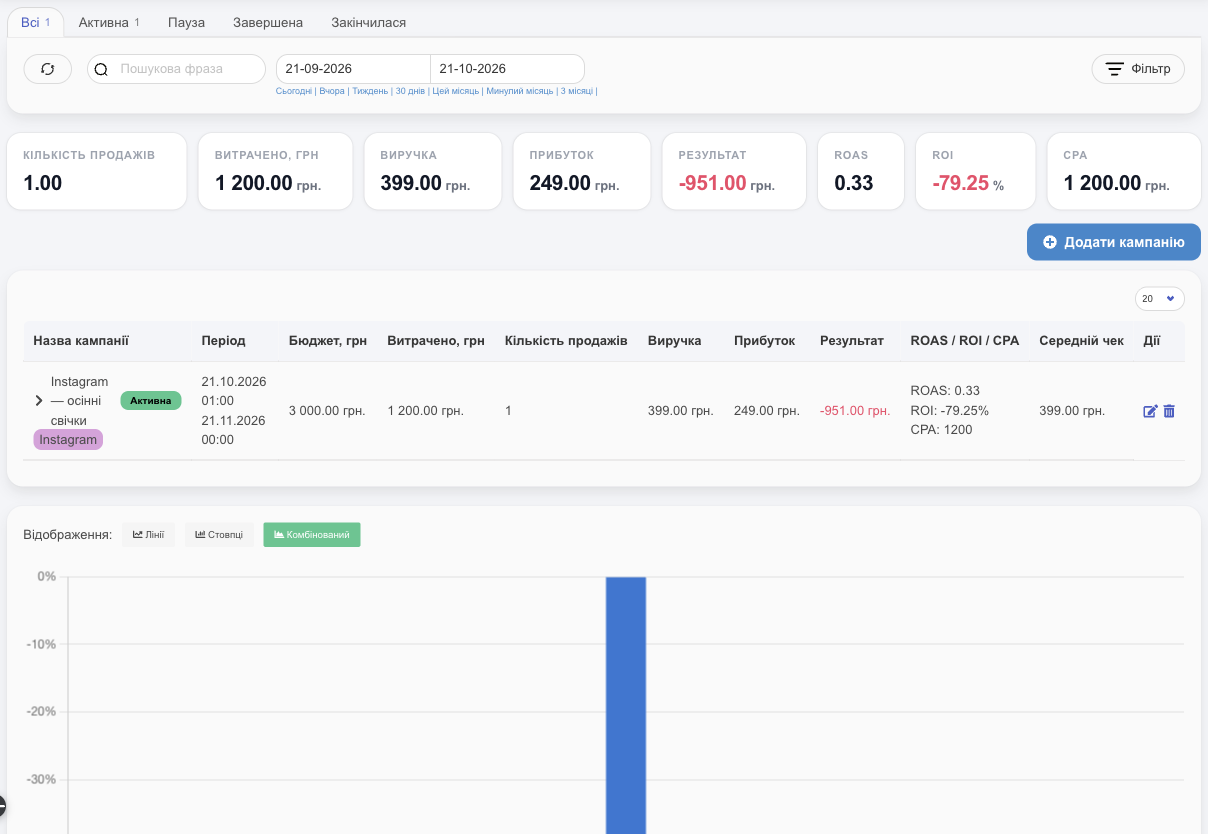
| Metric | How it's calculated | Example from the screenshot |
|---|---|---|
| Sales count, Revenue, Profit | From the sales attributed to the campaign | 1 sale, 399 UAH, 249 UAH profit |
| Result | Profit minus ad spend | 249 − 1,200 = −951 UAH |
| ROAS | Revenue ÷ spend. Above 1 means the ads bring in more than they cost | 399 ÷ 1,200 = 0.33 |
| ROI | (Profit − spend) ÷ spend × 100% | −79.25% |
| CPA | Spend ÷ number of sales: what one sale costs you | 1,200 UAH |
| Average check | Revenue ÷ number of sales | 399 UAH |
- At the top are the totals for all campaigns selected by the filters (status tabs, period, channel).
- The arrow on the left of a row expands the campaign's list of sales.
- The chart at the bottom compares campaigns; choose the Lines, Bars, or Combined view.
💡 A negative ROI early in a campaign is normal until sales add up. Judge a campaign after a few weeks, and compare its CPA with the profit from a single sale.
Related guides: ad spend is recorded as expenses, and campaign results show up in reports alongside sales channels (Statuses and channels).
If you sell through Instagram, see CRM for Instagram stores for how to track ads, chats, and sales together.