
How to track manufacturing in HugeProfit
Manufacturing is for businesses that make their own products from other products or raw materials: candles from wax and wicks, cakes, gift sets, furniture. You describe the recipe (template) once, then “produce” the quantity you need in one click: the components are written off from the warehouse, the finished product is added, and its cost price is calculated automatically.
💡 Manufacturing or a bundle? A bundle is assembled at the moment of sale and has no stock of its own. Manufacturing creates real stock of the finished product in advance and lets you account for production expenses (labor, packaging, electricity).
Production template (recipe)
- Products → Manufacturing → Create Production Template.
- Components: find them in the top The product name/SKU/brand name field. If a product is in several warehouses, expand it with the arrow and choose the warehouse to write it off from. Enter the quantity per production run.
- Use actual cost of products: when it's on, the component cost is taken from the product's current cost price; when it's off, from the prices saved in the template.
- Production Expenses → Add expense: the category, description, and amount per production run (the craftsperson's labor, a box, workshop rent).
- Template Name and, optionally, Production categories to group your templates.
- The product you're making: in the bottom search field, choose the finished product or create a new one (Create: …). Enter how many units one production run yields. There can be several finished products; in that case, split the cost price between them.
- Create Production Template.
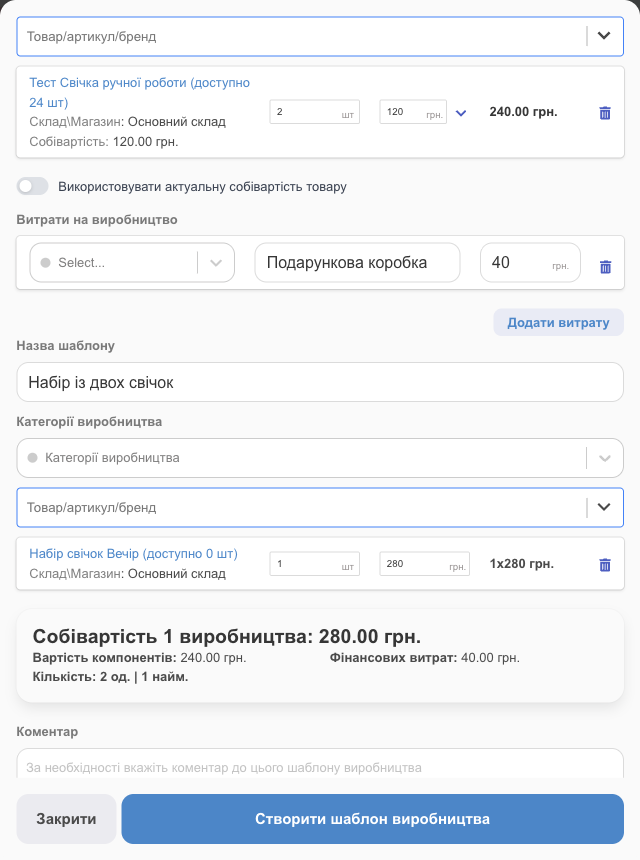
At the bottom of the template, you'll see Cost of one production = The Cost of Components + Financial Costs.
Produce goods
- In the template row, click Produce Goods.
- How many times to use the production template? Enter, for example, 3. The component quantities, expenses, and cost price are recalculated.
- Debit Production Costs: the account the expenses were paid from.
- Produce Goods.
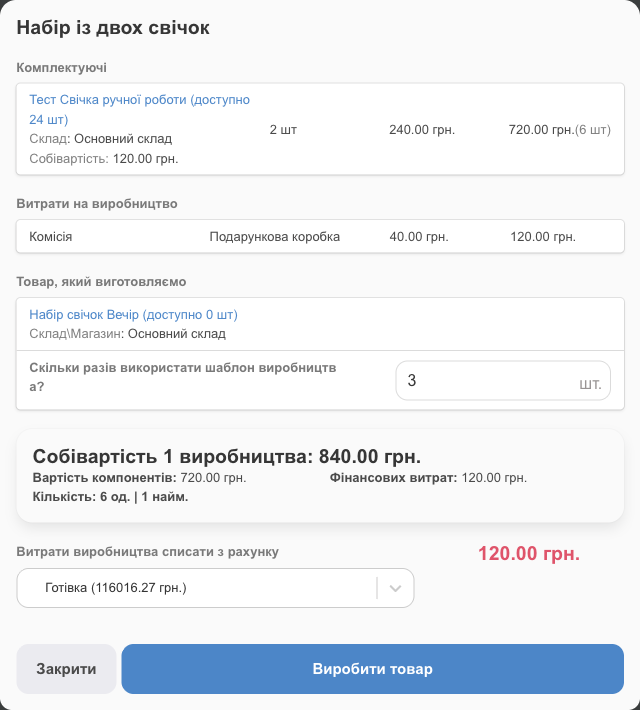
✅ “The product has been produced! Components have been written off. Costs added.” The components are written off from the warehouse, the finished product appears in the warehouse at the production cost price, and the expenses are recorded against the account.
Before you start, make sure there are enough components in the warehouse (the template shows available … pcs); if you're short, receive them with a shipment.
Example: a handmade backpack
- Create the products: the finished backpack and all the materials, such as leather (in meters), a bow, a zipper, and a carabiner. It's convenient to receive the materials with a shipment so their cost price is accurate.
- Template: components for one backpack are 0.5 m of leather, 1 bow, 1 zipper, and 2 carabiners; a “Craftsperson's labor” expense of 300 UAH; the finished product is “Backpack”, with a yield of 1 pc.
- You sewed a batch of 10: Produce Goods, How many times to use the production template? 10, and the account to pay for the labor.
- Result: +10 backpacks in the warehouse at a cost price of “materials + labor”; 5 m of leather, 10 bows, 10 zippers, and 20 carabiners written off from the warehouse; and a 3,000 UAH labor expense on the account.
Templates and history
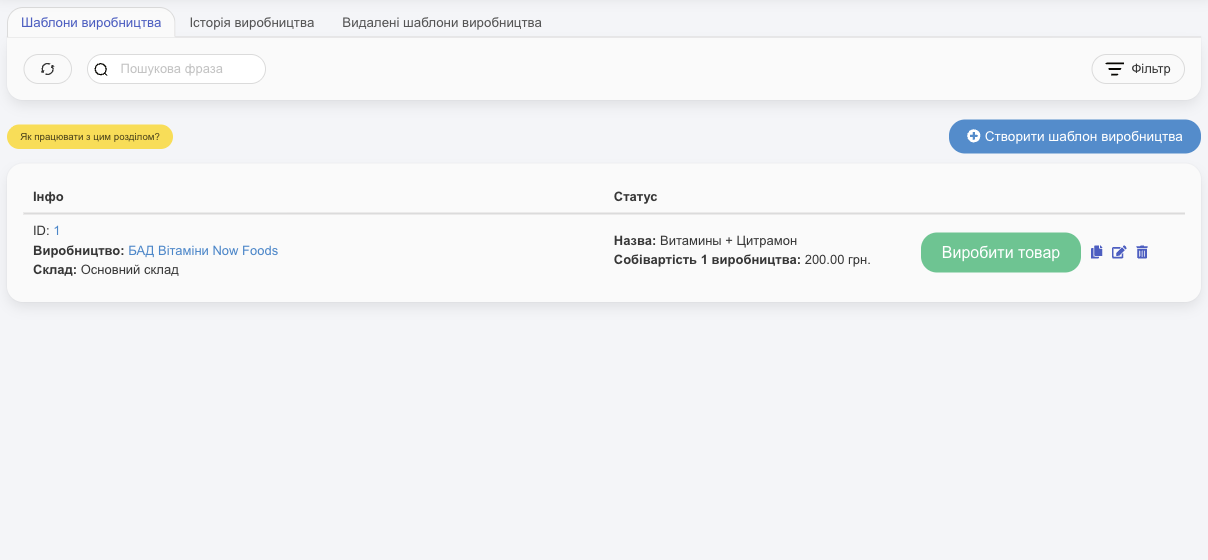
- Manufacturing Templates: each row has Produce Goods, copy, edit, and delete. Deleted templates are on the Deleted production templates tab, where you can Restore them.
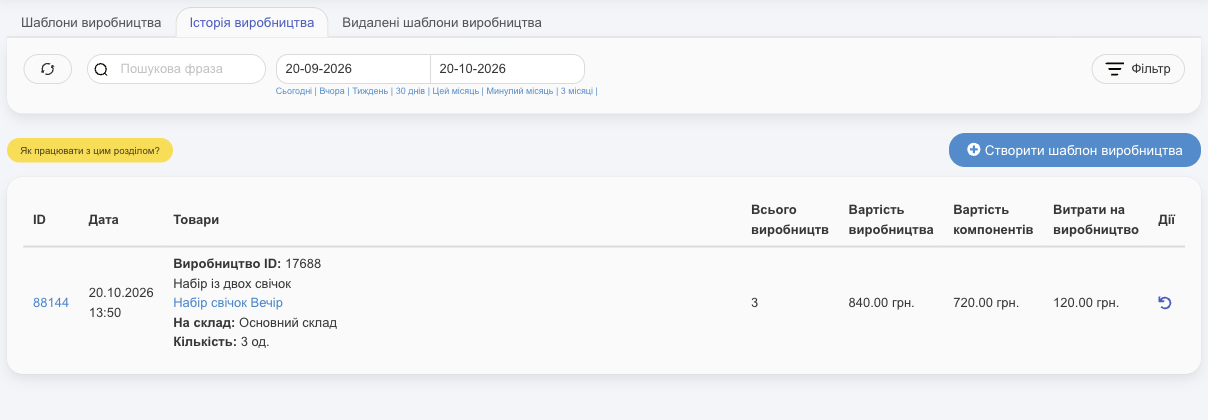
- Manufacturing history: each run with its date, template, finished product, warehouse, Total production, Manufacturing Cost, The Cost of Components, and Production Expenses. Actions: print (with sale prices, price tags) and cancel ↶ to roll back the production run.
- Filter by period, production category, and warehouse.
💡 If you don't make anything, you can turn this module off: Settings → System modules → Manufacturing.
Learn how HugeProfit helps small manufacturers calculate the cost price of finished goods on the manufacturing accounting page.