
Team and settings
HugeProfit notifications: integration errors and important events
The bell in the top bar shows notifications from HugeProfit: integration errors, completion of long operations (import, stock updates), parcels waiting at a branch, and service news. The number on the bell is the unread count.
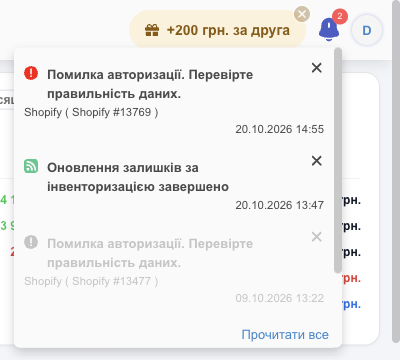
- The icon color shows importance: red is an error (for example, Authorisation Error. Check the correctness of the entered data. for an integration), yellow is a warning, green is a successful completion. Read notifications are gray.
- Below the text you see the source (an integration, for example “Shopify (Shopify #13769)”, a delivery service, or a module) and the date.
- Click a notification to open it in full (More): it lists the parcel or product IDs and the error details.
- ✕ deletes a notification; Read all marks all of them as read.
On a phone, the bell opens a separate notifications page.
What to do about an error notification
- Integration authorization error: the marketplace key or password has changed or expired. Open Settings → Integration, check the connection details, and save again.
- Parcels waiting at the branch / paid storage soon: open the notification to see the numbers and contact the buyers. See Delivery and waybills.
- If it's unclear what an error means, write to the support chat and forward the notification text.
💡 CRM notifications are visible only while HugeProfit is open. To avoid missing something important, connect the Telegram bot and push notifications in the app: Account settings → “Notifications”.