
How to connect the Rozetka marketplace to HugeProfit
The Rozetka marketplace integration: orders arrive in HugeProfit, stock and prices are uploaded to Rozetka, statuses and waybills (TTN) are sent back, and buyer messages go to the Chats module. To connect, you need the login and password for your Rozetka seller account.
1. Login details
HugeProfit signs in to the Rozetka seller account with the same login (email) and password you use. Check them in the seller account: Settings → My profile.
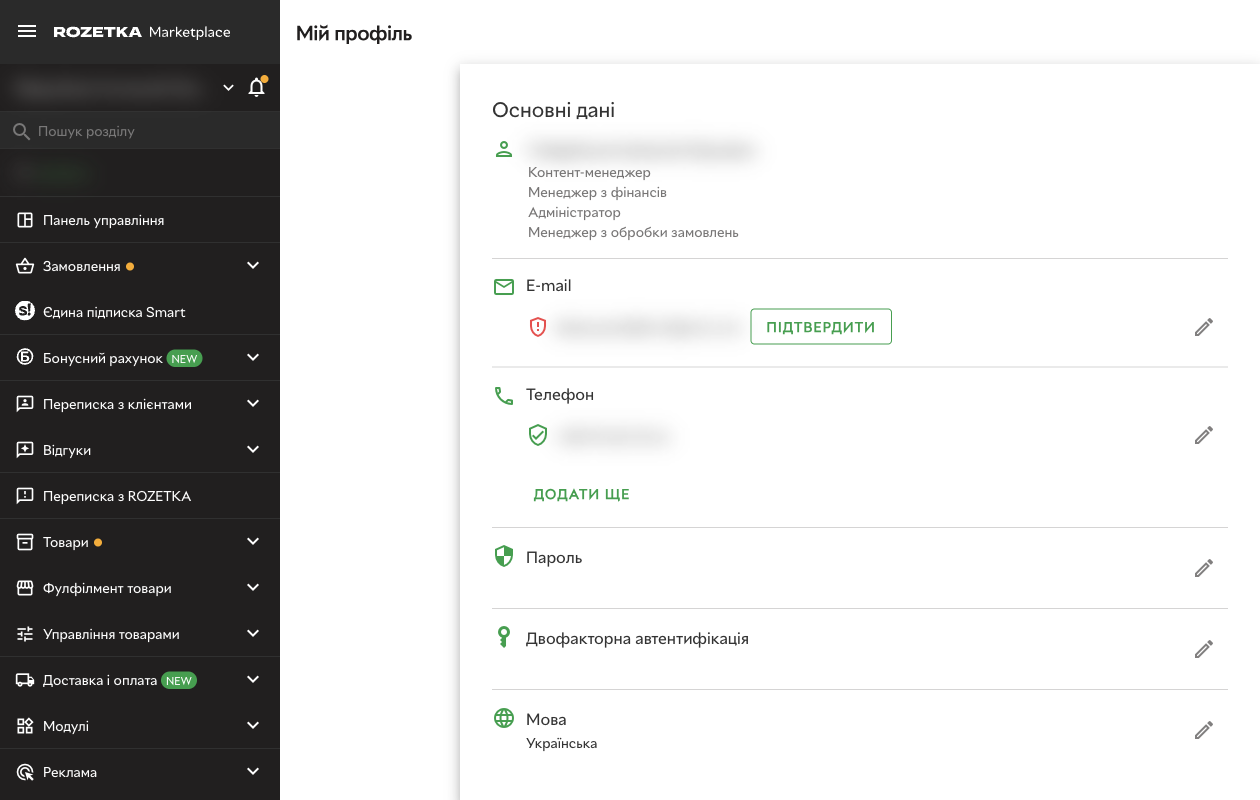
💡 Keep in mind: if you change the password in your Rozetka account, you also need to change it in HugeProfit. To avoid depending on the owner's password, create a separate manager for HugeProfit: seller account → Settings → Managers → Add manager, and connect the integration with that manager's login and password.
Price list sync type
To have HugeProfit update stock and prices on Rozetka instead of an XML price list, open Product management → Price list management in the seller account and choose the Personal account (API) sync type.
⚠️ If you leave sync set to an XML link, Rozetka will periodically overwrite stock and prices from the price list, and changes from HugeProfit will be lost.
2. Connecting in HugeProfit
Settings → Integration → Marketplaces → Rozetka → Connect.
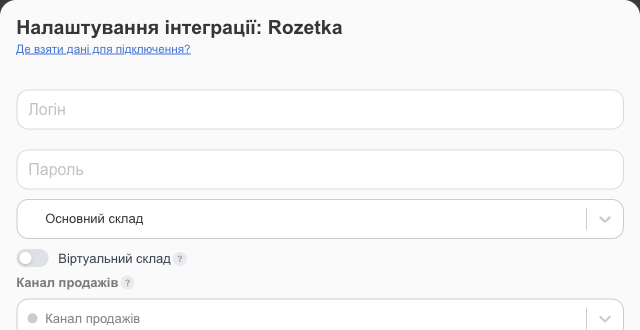
- The seller account Login and Password.
- The warehouse, Virtual warehouse, Sales channel, What price to upload?, what to send to and from the marketplace, and additional settings work the same as for Prom (each field is described in detail there). Rozetka has no separate language setting or “Ready to send” option.
- Save, then import products from Rozetka (see the integrations overview). Only active products in the seller account are imported.
⚠️ HugeProfit and Rozetka products are linked by matching SKU. If the SKUs differ, the product won't be linked, and an import that creates products will add a duplicate: a new card with the name from Rozetka. Before the first import, make the SKUs match or start with Link existing products WITHOUT creating new ones. You can't create a new product on Rozetka from HugeProfit; add it in your Rozetka account first.
3. Orders and delivery
- New Rozetka orders appear in Orders. Orders also arrive for unlinked products; in that case, you'll have to choose the product in the sale manually.
- For orders shipped with Rozetka Delivery, the waybill is created through Rozetka. For Nova Poshta and other services, it works as usual, and the waybill number is sent to Rozetka when Update order statuses is turned on.
- To map Rozetka statuses to yours, use the Download a list of statuses button on the integration card and the status settings (Statuses and channels).
Troubleshooting
| Problem | What to do |
|---|---|
| The integration became inactive, and you got the notification “Authorisation Error. Check the correctness of the entered data.” | The password in your Rozetka account was changed. HugeProfit turns off the integration when the password is wrong. Enter the new one and save. |
| Can't sign in | Try signing in at seller.rozetka.com.ua with the same details. If sign-in requires a two-factor code and the integration won't connect, contact HugeProfit support. |
| Stock doesn't update | Check the integration's warehouse and Update Stock, and make sure the products are linked (Bulk linking). Check the price list sync type in your Rozetka account: it must be Personal account (API) (see section 1). |
| The price on Rozetka is slightly higher than in HugeProfit | Rozetka accepts only whole prices without kopecks, so HugeProfit rounds the price up: 499.50 → 500. |
| A product from Rozetka was duplicated | The SKUs in HugeProfit and on Rozetka are different. Make them match, delete the extra card, and link the product manually (Product binding). |
Learn what else HugeProfit offers Rozetka sellers on the CRM for Rozetka page.