
How to connect Kasta to HugeProfit
The integration with the Kasta (Modna Kasta) marketplace: import products from Kasta, update stock and prices, receive orders, and send statuses back. To connect, you need an API token from Kasta Hub. The integration is marked BETA.
1. Get a token in Kasta Hub
Sign in to Kasta Hub → Settings → General → the API tab.
Click Create token and copy it right away: once it's created, Kasta shows only part of the token.
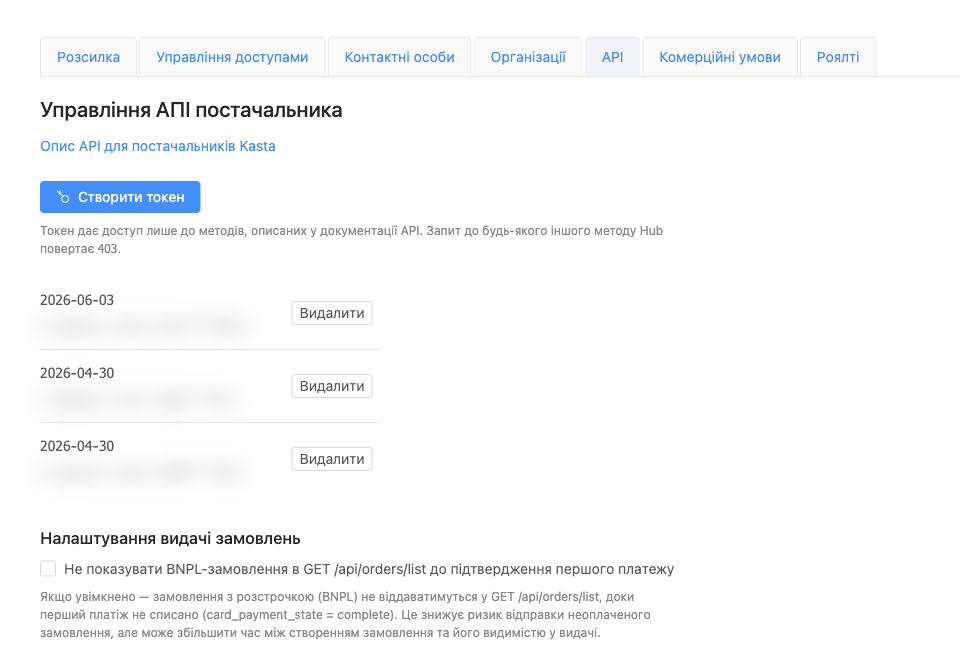
You can delete old tokens with the Delete button, but not the one you pasted into HugeProfit, or the integration will stop working.
2. Connect in HugeProfit
Settings → Integration → Marketplaces → Kasta → Connect.
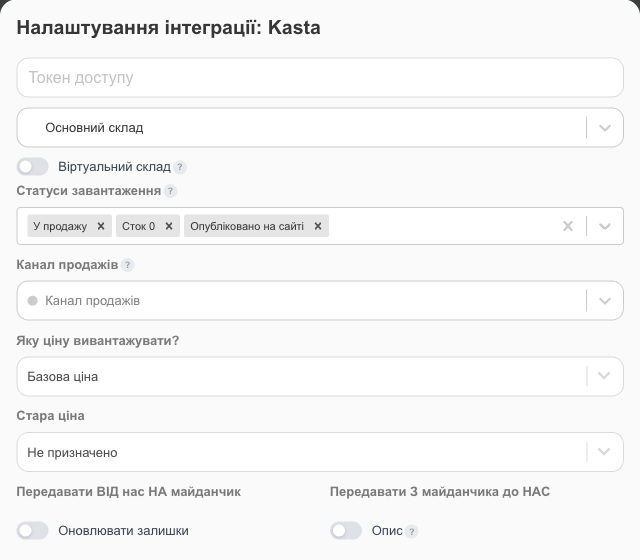
- Access token: the token from Kasta Hub.
- Warehouse: Kasta products are imported into and linked to this warehouse, and stock and prices are taken from it. You can't change the warehouse after saving, so create the warehouse you need in advance.
- Load statuses: which Kasta statuses to import products from into HugeProfit. By default, On sale, Stock 0, and Published on site; you can add drafts, products under manager review, awaiting price confirmation, rejected, and so on (each is described in the “?” tooltip). Note that Kasta calls itself the “buyer” and you the supplier, so Buyer declined price means a Kasta manager rejected your price.
- Old price: which of the additional prices to send to Kasta as the “old” (struck-through) price; Not assigned means don't send one.
- Virtual warehouse, Sales channel, What price to upload?, what to sync in each direction, Do not receive orders, and Disable product reservations work the same as in Prom.
After saving, import products from Kasta and check the product linking. See also the integrations overview.
3. How Kasta products are matched to yours
When you click Import products, HugeProfit looks for a match for each Kasta product in this order:
- by the combination of brand + SKU + color + size, so fill in the brand, SKU, and the Color and Size attributes in your products the same way as on Kasta;
- if there's no match, by barcode;
- if there's still no match, by SKU, but only if that SKU is unique both in your account and on Kasta.
Kasta orders contain only the product's unique supplier ID. So during import, HugeProfit writes this ID on Kasta for every product that doesn't have one yet (for a linked product, its ID in HugeProfit). You don't need to do anything separately: if a product already has a supplier ID on Kasta, HugeProfit uses it.
You can link unmatched products manually: with the gear icon in the product row or through Bulk linking. Orders for unlinked products still come in, but you'll have to choose the product in the sale manually.
4. Statuses and waybills
Kasta accepts statuses only in its own order: confirmation → packing → waybill (TTN). To send statuses and waybills, turn on Update order statuses, and check how your statuses map to Kasta's with the Download a list of statuses button on the integration card.
- When a waybill (Nova Poshta, Ukrposhta, Meest) appears in a sale, HugeProfit automatically sends the skipped steps (confirmation and packing) and registers the waybill on Kasta.
- Once the waybill is registered, HugeProfit stops sending statuses: Kasta tracks the delivery itself. Kasta doesn't allow you to change a registered waybill.
If something doesn't work
| Problem | What to do |
|---|---|
| Authorization error | The token was deleted in Kasta Hub. Create a new one and paste it into the integration settings. |
| Not all products were imported | Add the statuses you need to Load statuses and import the products again. |
| A product didn't get linked | Make sure the brand, SKU, color, and size in HugeProfit match Kasta, or that the barcode matches. Otherwise, link the product manually (Product linking). |
| A waybill or status didn't reach Kasta | Check Update order statuses. If a waybill is already registered on Kasta, Kasta won't accept a new one. |
| The price on Kasta didn't update | A price change on Kasta may be waiting for confirmation by a Kasta manager (the “awaiting price confirmation” status). |
You can run Kasta, Prom, Rozetka, and other marketplaces at the same time. See marketplace automation.