
Clients and marketing
Client database in HugeProfit
Your client database: contacts, delivery addresses, birthdays, tags, personal discounts, balance and debt, and purchase history. Clients get into the database on their own, from sales and orders, or you add them manually or import them from Excel.
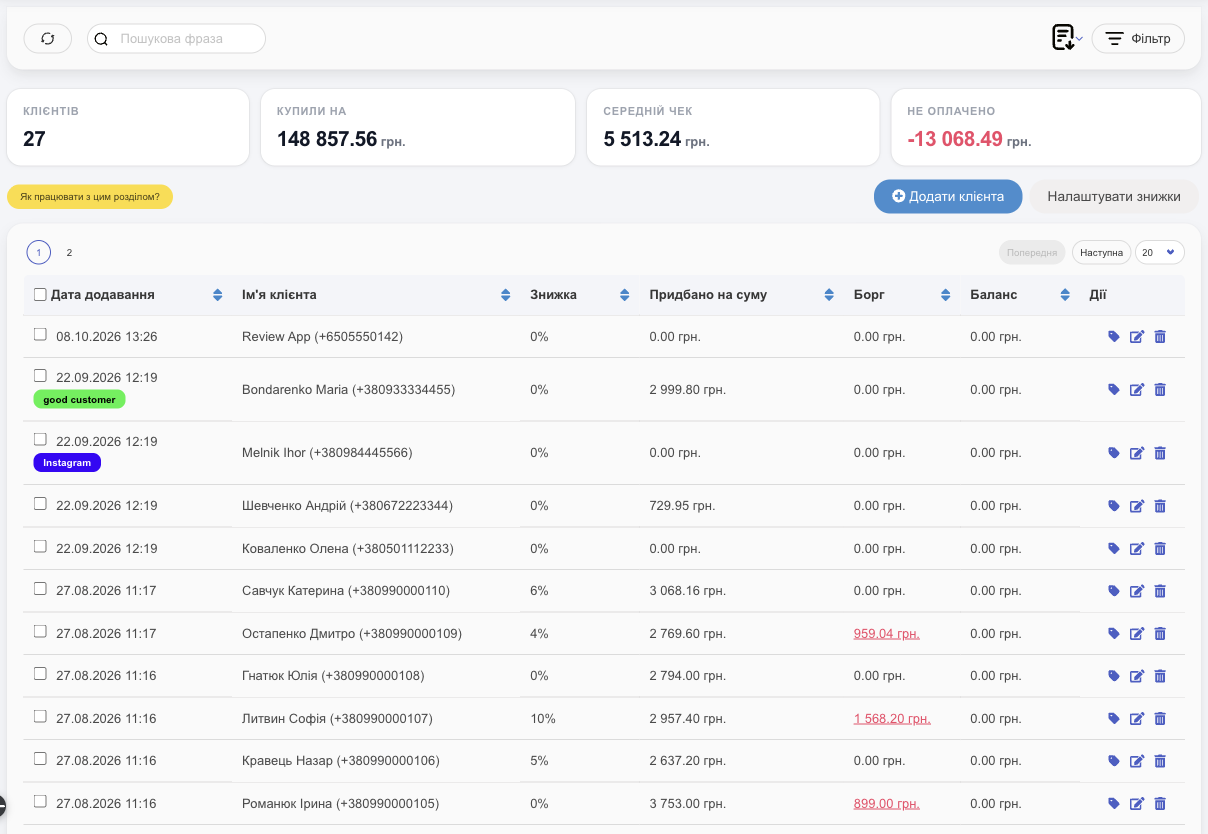
List
- Totals at the top: Clients, Bought on, Average check, Not paid (client debts), for the clients selected by the filters. The date filter selects clients by the date they were added to the database: narrow the period, and the client count in the totals goes down too.
- Columns: Date Added and tags, name and phone, Discount, Purchased for the amount, Debt (unpaid sales in red), Balance. Sort with the arrows next to the column names.
- Row actions: 🏷 client tags, ✎ edit, 🗑 delete. Click a row to open the client card.
- Filter: Delivery city, Tags, Company, creation date, Birthday and Child's birthday (today, this week, this month; handy for sending greetings), Purchased for the amount, Debt.
- The document icon: Download Excel and Upload from Excel.
Client card
Click a client in the list (or the name in a sale):
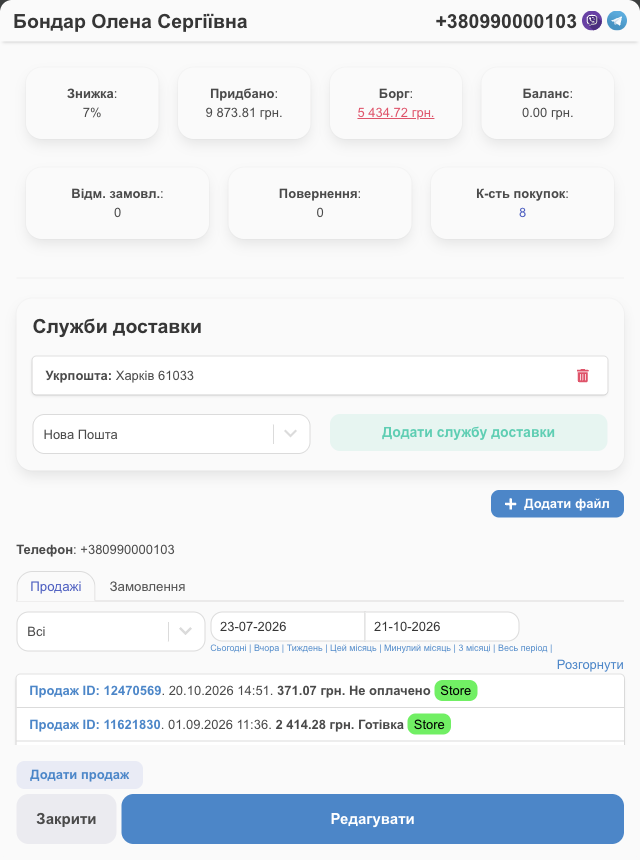
- Discount, total purchases, debt, balance, number of purchases, canceled orders, and returns.
- Delivery Services: saved addresses (Nova Poshta, Ukrposhta…); Add delivery service.
- Files (contracts, photos) and phone.
- The Sales and Orders tabs for a period show the purchase history; Expand shows the products.
- Add Sale creates a new sale for this client; Edit.
Add or edit a client
Click Add New Client (or, right in the sale window, use Create: … in the client field).
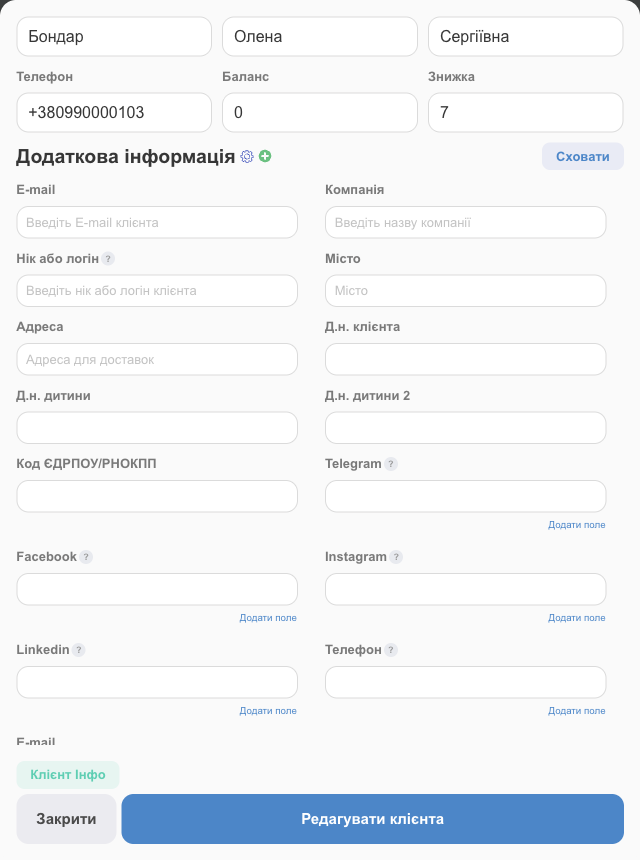
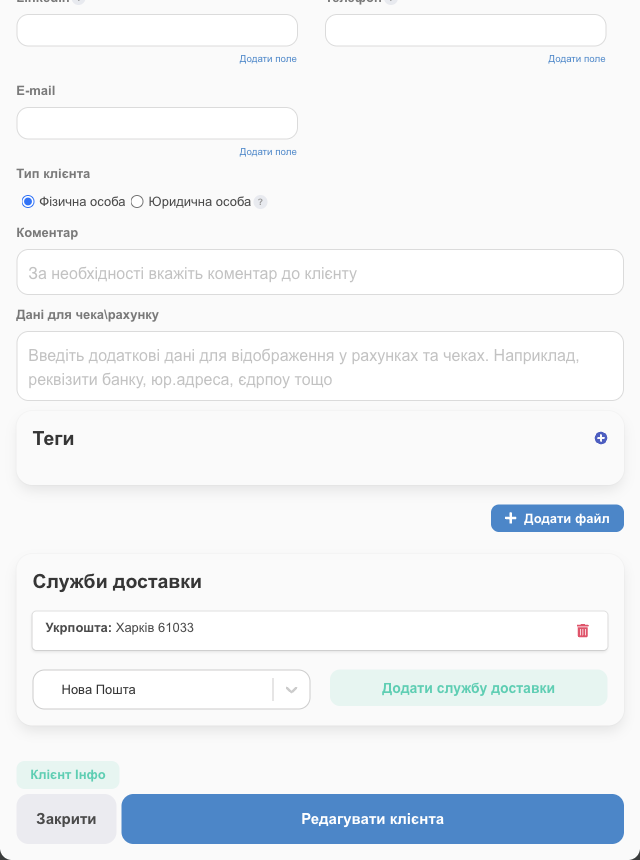
| Field | What it's for |
|---|---|
| Last name, first name, middle name, Phone | The phone number is the main identifier: it's how you find the client in a sale. Delivery services need the first and last name. |
| Balance | The client's money held by you (prepayment, bonuses). To use it in a sale, apply a fixed discount for that amount. |
| Discount | A personal discount in %, filled into sales automatically. It can be set by the discount system (Client discounts). |
| Additional Information | Email, company, nickname or username (for example, on Instagram), city, address, birthdays of the client and their children, EDRPOU/RNOKPP code (Ukrainian company or personal tax ID), Telegram, Facebook, Instagram, LinkedIn, extra phones and emails (Add field), Client type (individual or legal entity), comment, Receipt/invoice details (details for documents), and your own custom client fields (⚙ / ⊕ next to the heading). |
| Tags | Labels such as “regular”, “wholesale”, or “picky”. Used for filtering and grouping. |
| Delivery Services | Saved addresses for creating waybills (TTN) quickly. |
Tags
- To create a tag: Settings → Catalogs → Tags for the client → Add a client tag (name and color).
- To tag a client: 🏷 in the row or in the card.
- You can hide a tag from employees along with the sales of clients who have it (access setting Hide sales under a client tag?).
Import clients from Excel
- Document icon → Upload from Excel → download the template.
- Fill in the columns (the template headers are in Ukrainian; keep them as is): Повне ім’я (full name) or Прізвище (last name) + Ім’я (first name), Нік (nickname), Телефон (phone), Компанія (company), E-mail, День народження (birthday), Знижка % (discount %), Коментар (comment), Платіжні реквізити (payment details). Don't change the first row. Enter the full phone number (if a cell has several separated by commas, the first one is used). Enter the birth date with hyphens, for example 1990-05-17. You can add a День народження дитини (child's birthday) column. Moving your database from another program? Copy the data into the HugeProfit template: the column names must stay exactly as in the template.
- Upload the file.
Deleting
Click 🗑 in the row, or select several clients → Delete. This can't be undone.
Next: set up cumulative discounts for regular clients, link clients to conversations in Chats, and restrict employee access by client tag (Employees and access rights).
A client database with purchase history and sales channels is part of HugeProfit's CRM for online sales.