
How to connect OpenCart to HugeProfit
The integration with an OpenCart online store: import products from the website, update stock and prices on the website, receive orders, and send back statuses and waybills (TTN). HugeProfit works with OpenCart through the Rest Admin API module, which we provide along with a license key. To connect, you need the module's secret key and the store address.
1. Install the Rest Admin API module
HugeProfit provides the module. Download the archive for your OpenCart version:
| Version | Archive |
|---|---|
| OpenCart 2 (except 2.3) | oc2.zip |
| OpenCart 2.3 | oc2-3.zip |
| OpenCart 3, ocStore 3 | oc3.zip |
| OpenCart 4 | restadmin.ocmod.zip |
- OpenCart 2–3, ocStore 3: unzip the archive and copy the contents of its
uploadfolder to the store's root folder (via FTP or your hosting file manager). If a developer runs your website, hand this step over to them. - OpenCart 4: admin panel → Extensions → Installer → upload
restadmin.ocmod.zipand click “Install” next to it.
💡 If you have a lot of products, ask your hosting provider or developer right away to raise the PHP memory_limit and post_max_size limits (for example, to 2048M). Otherwise, a large catalog may not import completely. If you have access to .htaccess, add the lines php_value memory_limit 2048M and php_value post_max_size 2048M; in httpd.conf, use the same lines with php_admin_value.
2. Enable the module and get the key
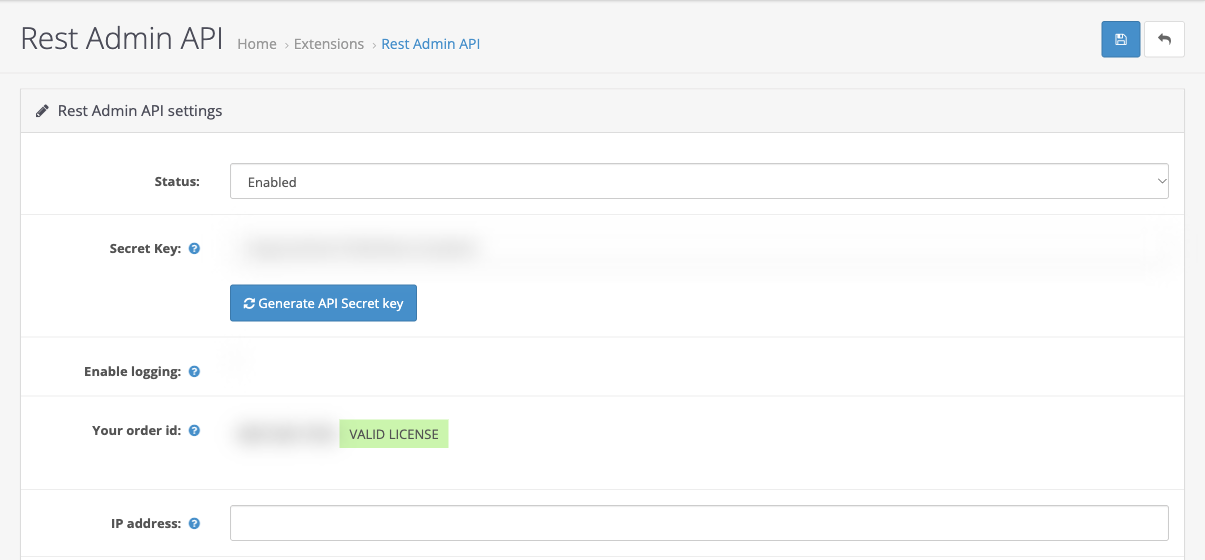
OpenCart admin panel → Extensions → Extensions → type Modules (in OpenCart 4, type Other) → Rest Admin API: install it (the green “+” if the module isn't installed yet) and click ✎ (edit).
Your order id: enter the license key REST-3E9-17754. After you save, VALID LICENSE appears next to it.
Status: Enabled.
Secret Key: if the field is empty, click Generate API Secret key (or enter any long string). Copy the key and save the module settings (the blue button in the top-right corner).
Leave IP address empty: if you restrict access to certain IPs, HugeProfit's requests will be blocked.
If your OpenCart 3 admin panel is in Ukrainian, the module fields are called Ключ з інструкції (“Key from the instructions”; the license key goes here), Секретний ключ (Secret key), and Статус (Status), set to Включено (Enabled).
3. Connecting in HugeProfit
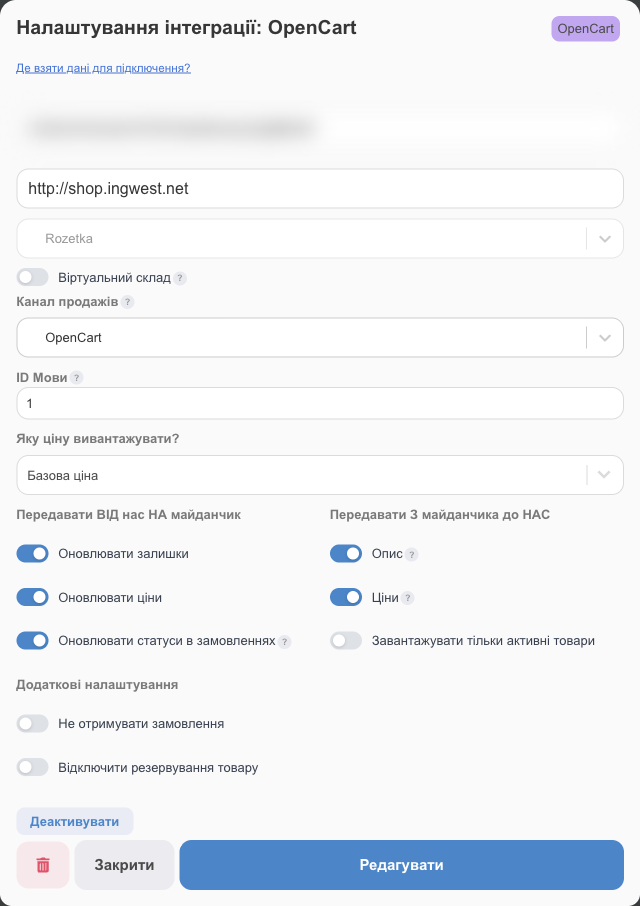
Settings → Integration → CMS → OpenCart → Connect.
| Field | What to enter |
|---|---|
| Access token | The Secret Key from the Rest Admin API module. |
| Store link | The store address as it appears in the browser, for example, https://shop.example.com (without /admin). |
| Language ID | The language HugeProfit uses to read and write product names and descriptions. You need the actual language ID, not its position in the list: OpenCart → System → Localisation → Languages → ✎ next to the language. The ID is shown in the page address (language_id=…). The main language is usually 1. |
| Only enabled products | Skip disabled products when importing from the website. |
| Warehouse, virtual warehouse, sales channel, price, sync, additional settings | Same as for Prom. |
After saving, import products from the website or upload yours to the website (see below).
4. Products: import, binding, upload
⚠️ HugeProfit and OpenCart products are linked by matching SKU. On the OpenCart side, this is the product's SKU field, not “Model”. If the SKUs differ, the product won't be linked, and an import that creates products will make HugeProfit add a new card with the name from OpenCart, even if you already have that product under a different name and SKU. So before the first import, make the SKUs match in both systems.
On the OpenCart card → Import products:
- Update all balances: stock in HugeProfit is overwritten with the quantities from OpenCart;
- Import new products without stock: new products are added with zero stock;
- Link existing products WITHOUT creating new ones: only link products, without creating anything;
- Import WITHOUT creating products: HugeProfit only remembers the website's product list, and you link the products yourself, with the gear icon in the product row or through Bulk linking.
HugeProfit takes the product description and price from the website only during the first import (the Description and Prices checkboxes in the Transmit from the site to us block). After that, prices are managed in HugeProfit and sent to the website if Update Prices is turned on.
Export products from CRM to the site creates products on OpenCart that aren't there yet and links them right away:
- HugeProfit creates any categories that don't exist on the website;
- each product variant (color, size) becomes a separate product on OpenCart, with the attribute values added to the name;
- the “Model” field of the new product gets its HugeProfit ID.
OpenCart orders also arrive for unlinked products, but then you'll have to choose the product manually in each sale, so it's easier to link the products once. Learn more in Binding products to integrations and the integrations overview (which uses the OpenCart card as its example).
5. Orders and statuses
- HugeProfit picks up new OpenCart orders automatically; they appear in Orders.
- Download a list of statuses on the card fetches the OpenCart statuses so you can map them to yours. With Update order statuses turned on, the status and waybill number are sent to the order on the website.
Troubleshooting
| Problem | What to do |
|---|---|
| Authorization error | Check that the Rest Admin API module is enabled, the key was copied in full, and the “IP address” field has no restrictions. If you generated a new key, update it in HugeProfit. |
| The API doesn't open / 404 error | Check the website address (without /admin, with the correct http/https) and that the extension is fully installed (including the files in the catalog folder). |
| Product names are in the wrong language | Change the Language ID. |
| “VALID LICENSE” doesn't appear | Check the key in the “Your order id” field (“Ключ з інструкції” in the Ukrainian admin): REST-3E9-17754, with no spaces. |
| A large catalog doesn't import completely | Raise the PHP memory_limit and post_max_size limits (see the tip in section 1). |
| A product from OpenCart was duplicated | The SKU in HugeProfit and the SKU field in OpenCart are different. Make them match, delete the extra card, and link the product manually (Product binding). |
| You changed a price or description on the website, but HugeProfit still shows the old one | That's expected: they're taken from the website only during the first import. Change prices in HugeProfit, and with Update Prices on, they'll go to the website. |
Learn what HugeProfit offers an OpenCart store on the CRM for OpenCart page.