
Integrations
How to connect Loyal Cards to HugeProfit
Loyal Cards is a service for digital loyalty cards in Apple Wallet, Google Wallet, and Telegram. Once it's connected, clients from HugeProfit automatically get digital bonus or discount cards, and you can send them unlimited push, geo, and iBeacon notifications.
What the integration does
- The client's card is created and updated on its own: when you add, edit, or delete a client in HugeProfit, the data is sent to Loyal Cards.
- Along with the client, their HugeProfit data is sent: contacts, discount (see Client discounts), and total purchases. How these appear on the card is configured in Loyal Cards.
- Mailings and notifications to cardholders are configured in your Loyal Cards account.
Connecting
- Settings → Integration → Other → Loyal Cards → Connect.
- Key is filled in automatically. This is the key Loyal Cards uses to access HugeProfit. You don't need to change it.
- Business name: your business name as it will appear on the card.
- Email and Phone: contacts for the Loyal Cards account (the phone number becomes the login). These are prefilled with your HugeProfit account contacts; change them if someone else should have access to Loyal Cards.
- Save. HugeProfit registers your business with Loyal Cards and starts sending clients.
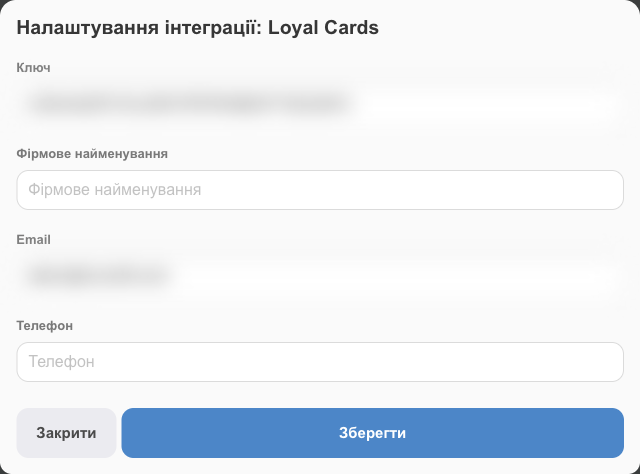
Next, set up the card design, bonus rules, and mailings in your Loyal Cards account. Step-by-step instructions are under the How to connect? link on the integration card.
After connecting
- Loyal Cards sends an email with access to your account to the address you entered in the form.
- A new Loyal Cards account starts in test mode: you can browse all the settings but can't save changes. The test period terms, default bonuses, and pricing plans are set by Loyal Cards; ask their support for details.
- The loyalty program and card design for your plan are set up together with the Loyal Cards team.
- You can't use HugeProfit's built-in loyalty program (Client discounts) and Loyal Cards at the same time; one of them must be turned off.
If something doesn't work
| Problem | What to do |
|---|---|
| A message from Loyal Cards appeared after saving | Most often, an account with this phone number or email already exists. Enter different contacts or contact Loyal Cards support. |
| Wrong key, Invalid Email Format, Invalid phone number format | The key must be exactly the one filled in automatically (32 characters). If you changed it, close the window without saving and open it again. Check the email and phone number. |
| The client isn't in Loyal Cards | Make sure the integration is active, and save the client card in HugeProfit again: data is sent when a client is created or changed. |
Related guides: the built-in loyalty program, Client discounts (unavailable while Loyal Cards is connected); your client base, Clients.