
Multi-currency: purchasing and accounts in foreign currency
Do you buy products in dollars, euros, or zloty and sell them in hryvnias? Multi-currency in HugeProfit means foreign-currency accounts, shipments in a foreign currency, and an exchange rate that converts purchases into hryvnias. This way you see the real cost price and net profit of every sale, even when the rate changes.
What you can keep in a foreign currency
| What | In a foreign currency? | How it's calculated |
|---|---|---|
| Accounts (cash, card, sole proprietor (FOP) account) | Yes | The balance is in the account's currency. |
| Shipments (purchasing) | Yes | The purchase price is stored in the foreign currency, and the cost price in hryvnias at the exchange rate. |
| Transfers between accounts in different currencies | Yes | At an exchange rate that's filled in automatically and that you can change. |
| Expenses from a foreign-currency account | Yes | In reports and on the dashboard, they're converted to hryvnias at the rate from the settings. |
| Sales | No | Only in the account's main currency (usually hryvnias). |
Step 1. Create a foreign-currency account
Cash Flow → Transactions → Add New Account (or Add Account in the “Your Money” widget on the dashboard). Enter a name and opening balance, and choose the account currency, for example “Supplier dollars”. For more on accounts, see Accounts and transactions.
A currency appears in the shipment currency picker only once you have an account in that currency.
Step 2. Set the exchange rate
Profile menu → Settings → Exchange Rates. There are two ways to calculate the cost price:
- At the general rate: one rate per currency for all shipments. The product's cost price is calculated at the rate in effect at the time of sale. You can update the rate manually (Change the exchange rate) or turn on Update currency rate automatically. You can see which rate applied when in Rate history.
- Shipment rate: each shipment has its own rate, the one at which you actually bought the currency. The cost price of products from that shipment doesn't depend on later rate changes.
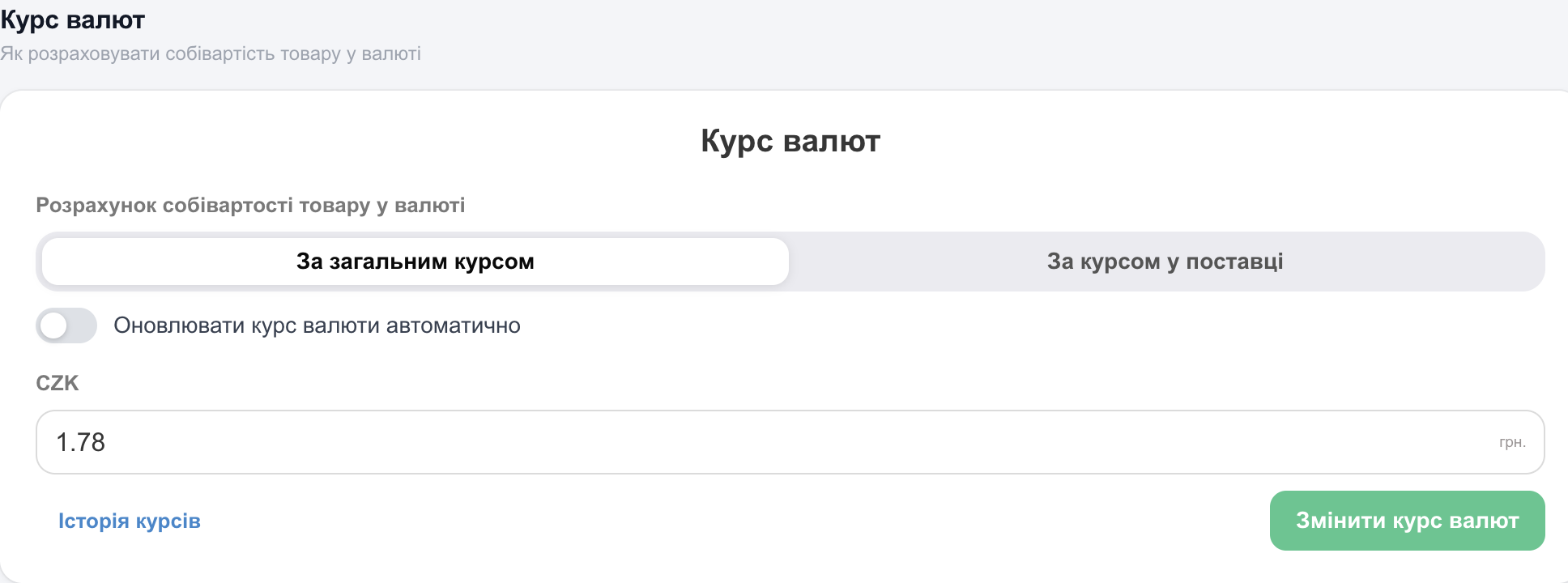
⚠️ If no rate is set, HugeProfit treats it as 1: a $25 product gets a cost price of 25 UAH, and the profit is overstated. Set the rate before your first foreign-currency shipment.
Which should you choose? The general rate is convenient when the currency is constantly in circulation and you want to see profit “at today's rate”. The shipment rate works when you buy currency for a specific purchase and want the exact cost price of that particular batch.
Step 3. Create a shipment in a foreign currency
- Products → Shipments → Create Shipment.
- Choose the currency in the Shipment Currency field. An Exchange Rates field appears for this shipment (the general rate is filled in, and you can change it). The Shipment amount is entered in the foreign currency, and you can pay it only from an account in the same currency.
- Add products with the purchase price in the foreign currency.
- When receiving the shipment, enter the delivery cost in the shipment currency: Charge for delivery from the account offers only accounts in that currency. Enter sale prices in hryvnias.
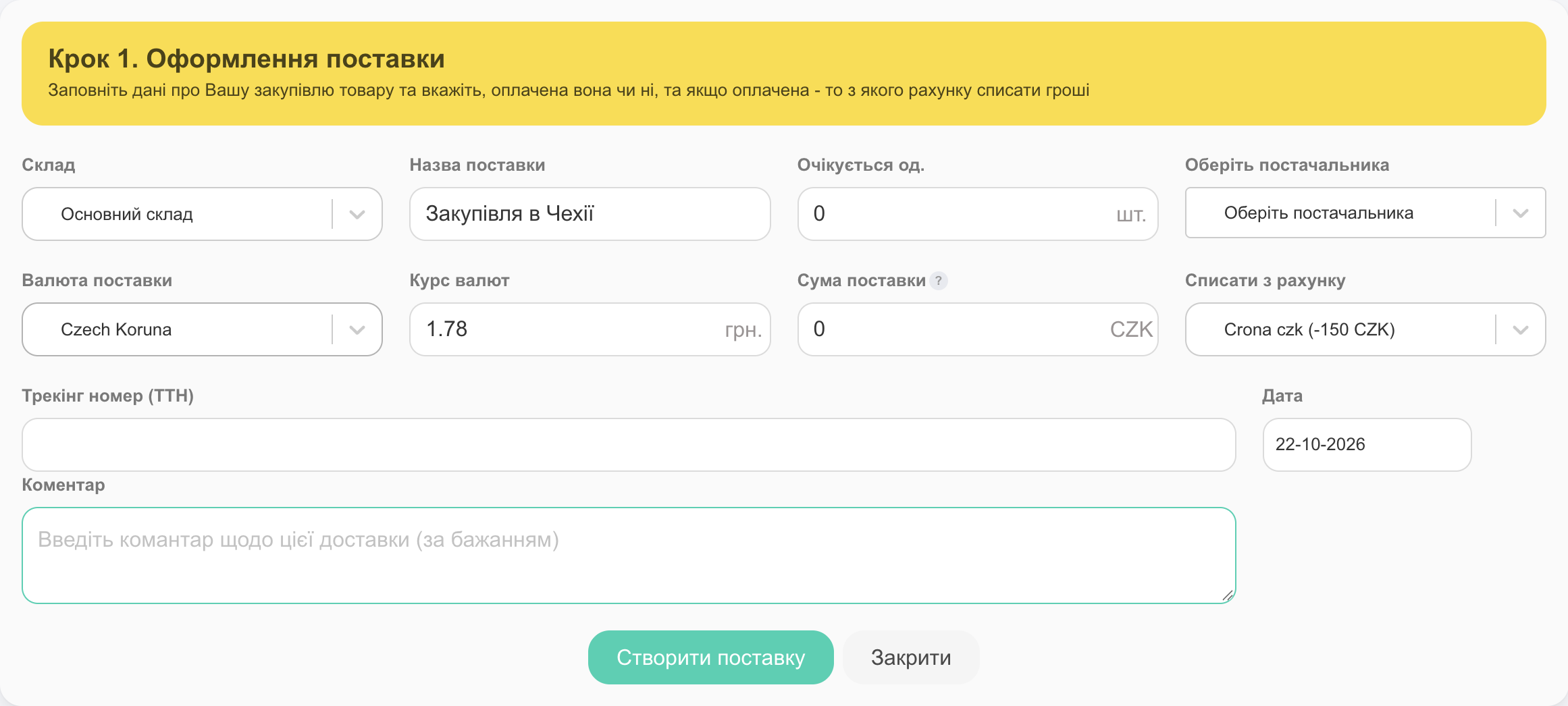
⚠️ If you add a product that already exists in HugeProfit, the Purchase Price is filled with its current cost price from the product card, in hryvnias and without conversion. Replace it with the price in the shipment currency; otherwise 900 UAH becomes $900, and the cost price ends up as many times higher as the number of hryvnias in a dollar (for example, 41 times).
For step-by-step instructions on shipments, see Shipments.
How profit is calculated
The purchase price is stored in the shipment currency, and the sale price in hryvnias. When a sale is made, HugeProfit converts the purchase price to hryvnias and locks the cost price into the sale, so later rate changes don't affect completed sales.
| Metric | Example |
|---|---|
| Purchase price | $25 |
| Exchange rate | 41.50 |
| Cost price in hryvnias | 25 × 41.50 = 1,037.50 UAH |
| Sale price | 1,590 UAH |
| Profit per unit | 1,590 − 1,037.50 = 552.50 UAH |
If the shipment included delivery, its per-unit share is added to the cost price in hryvnias.
Transfers and currency exchange
Bought dollars for a supplier? Make a transfer from your hryvnia account to the foreign-currency account: Cash Flow → Transactions → Transfers. When the From Account and To Account currencies differ, an Exchange Rates field appears:
- the rate is filled in from the settings; between two foreign currencies (for example, euros → dollars), it's calculated through hryvnias, and the formula is shown next to it;
- change the rate to the one you actually exchanged at; Withdraw from the account and Will be credited to the account appear at the bottom;
- enter the bank fee in the The transfer fee field (as a % or a fixed amount). For details, see Transfers between accounts.
Currency in reports
- A foreign-currency account's balance is shown in its own currency.
- Expenses from foreign-currency accounts are converted to hryvnias in reports and on the dashboard at the rate from the settings.
- Payment for a foreign-currency shipment is calculated at that shipment's rate.
FAQ
Can I sell in dollars?
No. Sales, sale prices, and the cash register use the account's main currency. Foreign currencies are for purchasing and accounts.
The rate changed. Will profit on past sales be recalculated?
No, the cost price is locked at the time of sale. A new rate affects future sales (with the general rate) or new shipments (with the shipment rate).
Why is the profit on a foreign-currency product so high?
Most often, no rate is set (so it equals 1), or the shipment still has the old purchase price in hryvnias. Check Exchange Rates in the settings and the prices in the shipment.
Why is the cost price dozens of times higher, and the account deep in the negative?
The foreign-currency shipment kept the hryvnia price from the product card (see the warning in step 3): 900 UAH was recorded as $900 and multiplied by the rate. Correct the Purchase Price in the shipment to the amount in the foreign currency. Then check the cost price in the product card and the shipment payment amount in “Cash Flow” → “Transactions”. If it's still the old amount, correct it manually or contact support.
Can I pay for a foreign-currency shipment from a hryvnia account?
No. Both the shipment amount and the delivery can be paid only from an account in the same currency. First make a transfer with exchange to the foreign-currency account.
We pay for delivery locally in hryvnias. How do I enter it?
Convert the delivery amount to the shipment currency at the rate you paid (for example, 820 UAH ÷ 41 = $20), and enter it when receiving the shipment, from the foreign-currency account. This way the delivery is correctly allocated to the products' cost price. If you don't have a foreign-currency account with enough money, first make a transfer with exchange from your hryvnia account.
Related guides: accounts and transactions, shipments, account settings. Tracking money and profit is part of the accounting software.