
How to create a product promotion in HugeProfit
A promotion is a discount on selected products, categories, brands, or warehouses for a set period. It applies automatically in sales (marked “PROMO”) and at the register, and it can be exported to marketplaces.
Promotion list
Left menu → Marketing → Promotions. At the top you'll see Total discount, Sales, Products, and Active promotions. Below are current and scheduled promotions, with Finished promotions listed separately.
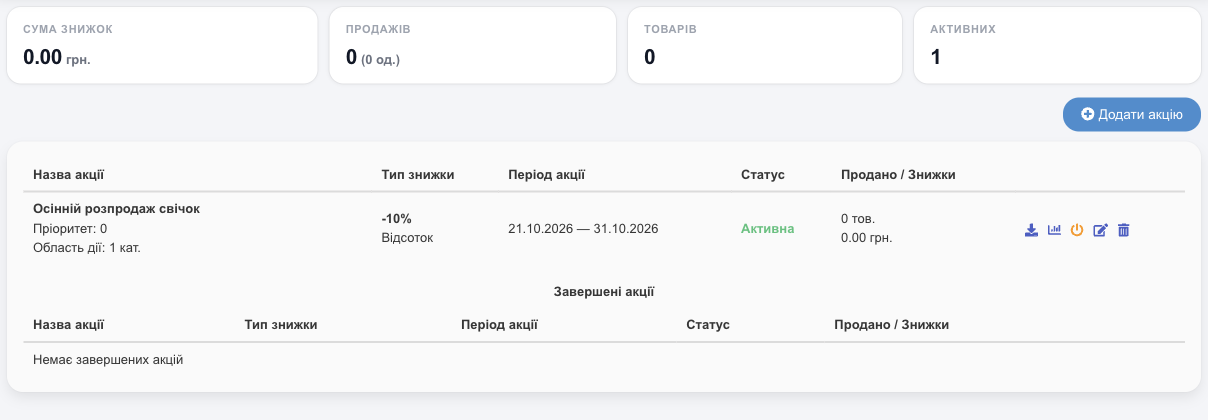
Each row shows the name, priority, and scope (how many products, categories, and brands), the discount type and value, the period, the status (Active, Scheduled, Inactive, Finished), and Sold / Discounts. Click a promotion to open Promotion statistics: which products were sold, how many, and the total discount given.
New promotion
Add promotion:
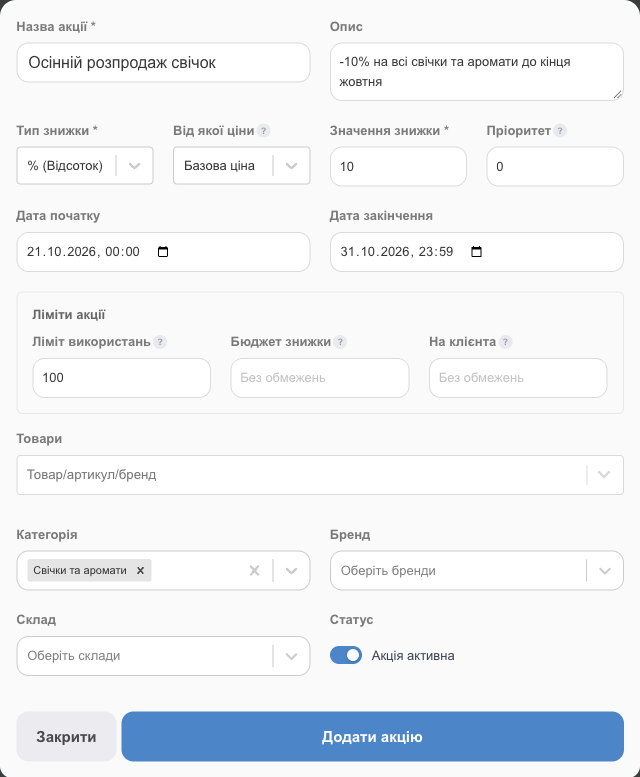
| Field | What to enter |
|---|---|
| Promotion name*, Description | For example, “Fall candle sale”. |
| Discount type* | % (Percentage) (0 to 99), Fixed amount, or New price, in which case you set the price for each product. |
| From which price | The base price or an additional price. If you choose an additional price, only products that have it filled in take part in the promotion. |
| Discount value* | The size of the discount. |
| Priority | If several promotions apply to a product, the one with the higher priority wins (100 over 10). |
| Start date, End date | The period the promotion runs. A promotion with a future date is Scheduled; once it ends, it's Finished. |
| Promotion limits | Usage limit: how many items can be sold under the promotion. Discount budget: the maximum total discount. Per client: how many times one client can use the promotion. When a limit is reached, the promotion turns off on its own. |
| Products, Category, Brand, Warehouse | What the promotion applies to: individual products and/or entire categories, brands, or warehouses. |
| Status | Promotion is active: turn it off to prepare a promotion in advance. |
| Don't apply client discount on top of this promotion | Unchecked: a discount on the whole sale (including a client's personal discount from the loyalty program) is also calculated from the promotional price. Checked: the sale discount doesn't apply to this promotion's products, only to the other products. |
Click Add promotion. HugeProfit offers to export the promotional prices to marketplaces right away (Prom, Rozetka, and others, if connected). Confirm or postpone.
How it works in a sale
- When you add a product to a sale, the promotional discount applies automatically; in the search list, such products are marked PROMO. In the sale row, under the product name, you'll see the promotion discount and the price it was calculated from, for example “Discount: 10% (from 500 UAH)” (see New sale).
- Price tags show the promotional price next to the old price struck through (see Price tags).
You can Disable promotion / Enable promotion, edit it, or delete it. Turn the module on in Settings → System modules → Promotions.
Related guides: personal client discounts, manual discounts in a sale, and price tags with the old and promotional prices.