
How to connect Etsy to HugeProfit
The integration with Etsy, the international marketplace for unique and handmade products, imports your listings into HugeProfit, syncs stock and prices, and receives orders converted from your shop's currency into yours. You don't need API keys: just allow access in the Etsy authorization window.
1. Connecting
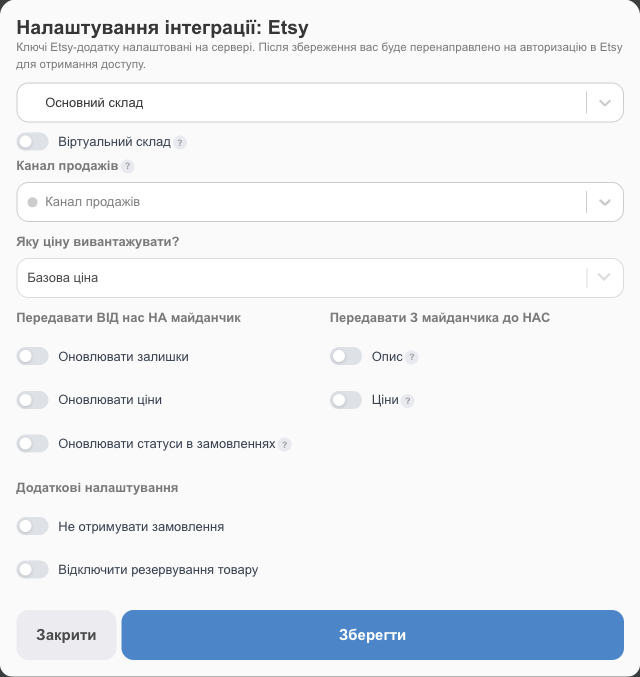
- Settings → Integration → Marketplaces → Etsy → Connect.
- Fill in the settings: the warehouse (and, if needed, Virtual warehouse), Sales channel, What price to upload?, what to send to and from Etsy, Do not receive orders, Disable product reservations. The fields work the same as for Prom.
- Save. An Etsy window opens: sign in to your seller account and allow HugeProfit to access your shop.
- Once you confirm, you'll see Etsy authorization completed successfully, and you can import products.
💡 The window didn't open? Your browser may have blocked the pop-up. Use the click here link in the Etsy Authorization message, or allow pop-ups for HugeProfit.
The Etsy account isn't available in Ukrainian, so the buttons in the authorization window may be in English or Russian (depending on your Etsy account language). Click the button that allows access (“Allow Access” in English).
2. Exchange rate
An Etsy shop usually works in dollars or euros, while HugeProfit keeps records in hryvnias. If the currencies differ, the settings of the connected integration show an Exchange rate: 1 USD → UAH block:
- by default, the general rate from account settings is used (it updates automatically if “Update currency rate automatically” is turned on there);
- Use a custom rate for this integration: enter your own rate, for example 41.5.
When you confirm the sale, the Etsy order amount is converted into your currency at this rate. In Orders, you can see next to the amount which currency it was converted from and at what rate.
3. Buyer details in Etsy orders
Etsy doesn't share all buyer details with third-party services:
- There's no buyer phone number: Etsy doesn't provide it through the API at all, even if you see it in your seller account. This isn't a HugeProfit error.
- The buyer's email is shared by Etsy only with separate permission, so it's usually missing too.
- The recipient's name and shipping address (address lines, city, region, postal code, country) come through in full.
The client is created in HugeProfit without a phone number. HugeProfit recognizes repeat orders from the same buyer by name and city (or email, if available) and doesn't create duplicates. If needed, add the phone number to the client card manually.
4. Re-authorization
The settings of a connected integration include Re-authorize Etsy. You only need it if access is lost (for example, you revoked HugeProfit's access in your Etsy settings); you don't need it for regular settings changes.
If something doesn't work
| Problem | What to do |
|---|---|
| Etsy Authorization Error | Connect again, and in the Etsy window sign in to the seller account that owns the shop. |
| Sync stopped | Re-authorize Etsy. |
| Order amounts differ from Etsy | Check the integration's exchange rate. |
| The order has no buyer phone number or email | That's how Etsy works; see the “Buyer details” section. |
You can run Etsy alongside Ukrainian marketplaces; see stock sync across marketplaces.