
Message templates for online store customers
Ready-to-use message templates for online store customers: order received, payment details, waybill number, pickup reminder, review request. Copy them into any chat (Telegram, Viber, Instagram, WhatsApp), or save them in HugeProfit as Quick replies to answer customers in Chats with one click.
How to use the templates
- Square brackets mark what to replace:
[name],[order number],[amount],[waybill number]. The template goes into the message field, and you can edit it before sending. - Write on behalf of the store, keep it short, and give the customer one clear next step.
- Use emoji to match your store's style; the templates keep them to a minimum so the text works for Instagram and OLX alike.
Ready-to-use message templates
Greeting and answering the first question
Hi, [name]! Thanks for messaging [store name]. Which product are you interested in, and what size, color, or quantity? We'll check availability and get right back to you.
The product is in stock
[Product name] is in stock, the price is UAH [price]. We can ship today. To place the order, please send your last name, first name, phone number, and city with your Nova Poshta branch number.
Out of stock: an alternative
Unfortunately, [product name] is out of stock right now. We expect it on [date]. We can offer a similar option: [name, price]. Shall we send photos?
Order received
Thank you for your order, [name]! Your order number is [order number], total UAH [amount]. We'll pack and ship it [today / tomorrow]. We'll send you the waybill number as soon as the parcel is handed over for delivery.
Payment details
Amount due: UAH [amount] for order [order number].
Recipient: [sole proprietor's full name]
IBAN: [UA00 0000 0000 0000 0000 0000 000]
Payment reference: payment for order [order number].
After paying, please send the receipt to this chat, and we'll ship your order right away.
Instead of bank details, you can send a payment link for card payment, so the customer doesn't have to enter an IBAN.
Cash on delivery
We'll ship order [order number] with payment on delivery: at the branch, you'll pay UAH [amount] plus the carrier's money transfer fee. Please confirm that works for you.
Parcel shipped, waybill number
[Name], your order [order number] has shipped! Waybill number: [waybill number]. You can track the parcel in the Nova Poshta app or on its website. Estimated delivery date: [date].
Pickup reminder
[Name], just a reminder: your parcel [waybill number] is waiting at branch [branch number]. It's stored free of charge until [date]; after that, paid storage starts, and then the parcel will be returned to us. Please pick it up soon 🙏
While a parcel is at a branch, HugeProfit marks the sale “Waiting at the branch since” and “Paid storage is coming soon”, your cue to send a reminder (Delivery and waybills).
Review request
[Name], thank you for choosing [store name]! How do you like [product name]? We'd really appreciate a review; it helps other customers choose: [link to reviews]. If something isn't right, message us and we'll sort it out.
Return or exchange
Of course, you can return or exchange the item within 14 days if it hasn't been used. Ship the parcel by Nova Poshta to [last name, first name, phone, branch] and send the waybill number to this chat. We'll refund your card within [number] days after we receive it.
How to save templates as Quick replies in HugeProfit
Quick replies work in Chats for all connected messengers: Telegram, Instagram and Facebook, Viber, OLX, and Prom and Rozetka chats.
- Open any chat and click ⚡ Quick replies next to the message field.
- Paste the template text into the Add quick reply... field.
- Choose who the template is for: Personal (only you see it) or Common (the whole team). Common templates help every manager answer the same way.
- If needed, 📎 attach a file up to 4 MB: a price list, payment details in PDF, a size chart.
- ⊕ saves it.
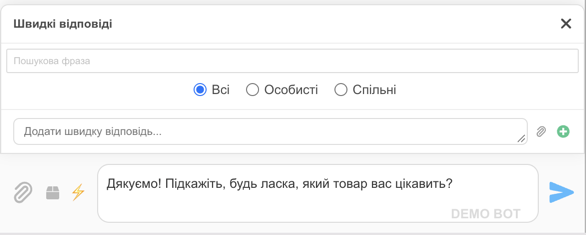
To reply, click ⚡ and choose a template (there's a search); its text and file go into the message. Replace the bracketed details and send. The reply goes to the messenger the customer wrote from.
💡 Separately from chats, HugeProfit can automatically send SMS or Viber messages when a sale's status changes ("order received", "shipped, waybill …", "waiting at the branch"), filling in the number, amount, and waybill automatically. You set this up through TurboSMS: SMS and telephony.
What about WhatsApp?
HugeProfit doesn't have a WhatsApp integration: WhatsApp conversations don't arrive in Chats. You can copy the templates from this page into WhatsApp Business quick replies and use them there. To keep all conversations in one place alongside your sales records, connect the channels HugeProfit supports: Telegram, Instagram, Viber, OLX.
How to sell in messengers while tracking products and money: see CRM for Telegram.