
How to create a Telegram bot for your store and connect it to CRM
How to create a Telegram bot for your store in 5 minutes without coding: you create the bot in the official @BotFather, and connecting it to HugeProfit CRM takes a minute. After that, customers' messages to the bot arrive in HugeProfit Chats: managers reply from there, see the client's card, and create a sale right from the conversation.
1. Create a bot in @BotFather
- In Telegram, find @BotFather, Telegram's official bot with a blue checkmark. Watch out for copycats with similar names.
- Tap Start and send the
/newbotcommand. - Enter the bot name: customers see it in their chat list, for example “Handmade Candles”. You can change it later.
- Enter a username in Latin letters ending in
bot, for examplesvichky_shop_bot. This is the bot's address,t.me/svichky_shop_bot, and it's hard to change later, so pick something short that resembles your store's name. If the username is taken, BotFather asks for another. - BotFather sends a message with a token, a string like
1234567890:AAH…. Copy it: you'll need it in HugeProfit.
⚠️ The token gives full access to the bot. Don't publish it or send it in chats. If the token falls into the wrong hands, the /revoke command in BotFather issues a new one, which you then paste into HugeProfit in place of the old one.
Brand the bot (optional)
To make the bot look like your store, send /mybots to @BotFather → choose the bot → Edit Bot:
- Edit Botpic: an avatar, such as your store logo;
- Edit Description: the text customers see before tapping Start: what you sell and how quickly you reply;
- Edit About: a short description in the bot's profile: website, business hours.
2. Connect the bot to HugeProfit
- Settings → Integration → the Chats tab → Telegram → Connect.
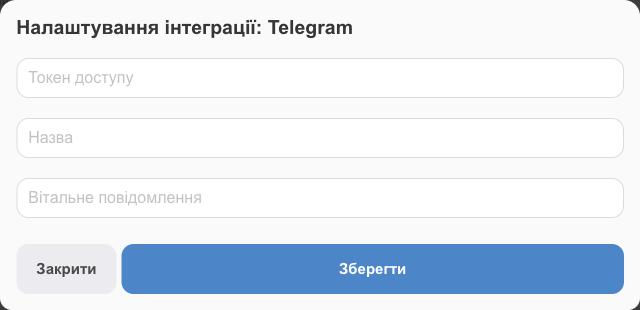
- Fill in:
- Access token: the token from BotFather, without spaces;
- Name: how to label the bot in HugeProfit if you have several (shown in the chat filter);
- Welcome message: what the bot sends when a customer taps Start. For example: “Welcome to [store name]! Tell us what you're looking for, and a manager will reply within 15 minutes.”
- Save.
- Test it: find your bot in Telegram, tap Start, and send a message. It will show up in Chats.
⚠️ A bot works with only one service. If this token is already connected to another CRM or bot builder, messages will go there instead of HugeProfit, so disconnect the bot there first.
3. Tell customers about the bot
- The
https://t.me/bot_usernamelink: on your website, in your Instagram bio, in a Viber mailing, on business cards, and in parcels. - A QR code with this link: on packaging or in your shop.
- Several stores or product lines: several bots. On the Telegram card, click Add another integration.
4. Working with the bot in HugeProfit
- Replies are in Chats: the customer gets the reply in Telegram from the bot. Save common answers as message templates (⚡ Quick replies).
- Products in chat: 📦 Send product sends a card with a photo, price, and description from your stock.
- Client and sale: link the conversation to a client or create a new one, and create a sale right from the chat. Stock, waybills, and money are all in the same records.
- Responsible manager and conversation statuses, so no one on the team misses a message. More in Chats.
Telegram limitations
- A bot can't message a customer first: the customer has to tap Start or write to the bot first.
- If a customer blocks the bot, replies aren't delivered.
- The bot isn't your personal account: conversations from your personal Telegram don't come into HugeProfit.
Troubleshooting
| Problem | What to do |
|---|---|
| Bot messages don't appear in Chats | Check that the token is pasted in full without spaces and the integration is active. If the bot is connected to another service, disconnect it there. |
| BotFather says the username is taken | Usernames must be unique across all of Telegram. Add a city or the word shop: svichky_kyiv_bot. |
| Lost the token | In @BotFather: /mybots → your bot → API Token. |
| The bot doesn't reply to a customer | The customer hasn't tapped Start yet; Telegram doesn't let bots write first. |
You can also connect Instagram, Facebook, Viber, and OLX to Chats: see Messengers. For selling through Telegram, see CRM for Telegram.